Participant
August 2, 2018
Question

install error 1500

  • August 2, 2018
  • 2 replies
  • 7625 views

I have done the following and i still cannot install Adobe Reader.

I am running windows 10 and it is fully up to date.  Virus protection is the built in Windows Firewall. 

Thanks for trying to solve this.
    This topic has been closed for replies.

    2 replies

    Participant
    March 21, 2022

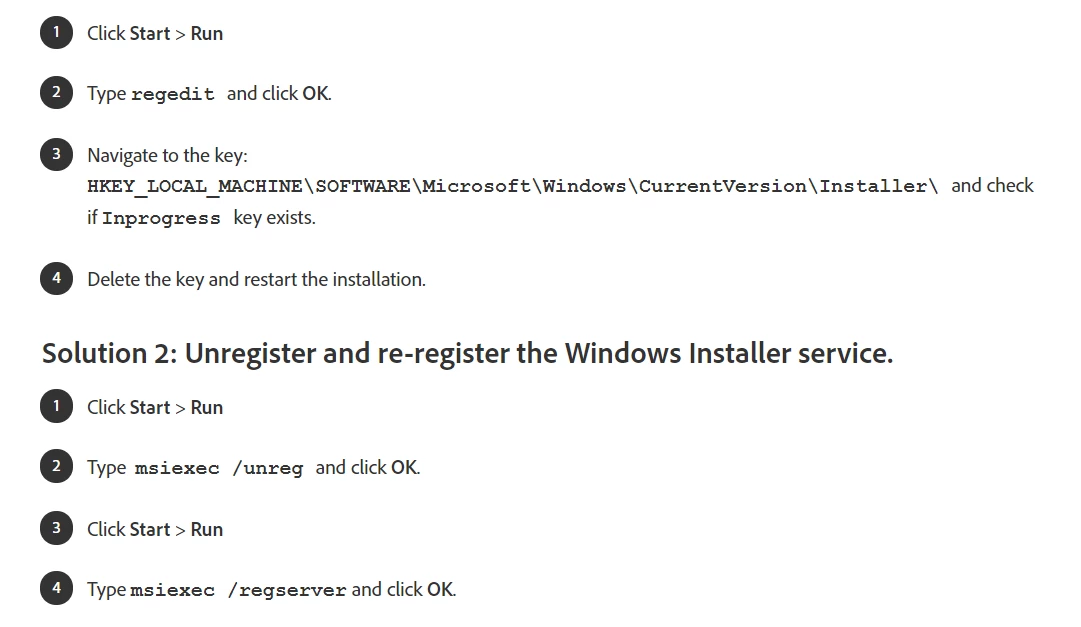
    Inprogress key is not in the string.


    AnandSri
    Community Manager
    Community Manager
    August 3, 2018

    Hello Bronwyno,

    We're sorry for the trouble you had while installing Adobe Reader DC, please reboot the machine and use Acrobat cleaner tool to remove any conflicting and corrupt installation files and previously installed Adobe Reader Download Adobe Reader and Acrobat Cleaner Tool - Adobe Labs

    Disable the security software for a temporary basis, reboot the machine again and install the latest version of Adobe Reader from Adobe - Adobe Acrobat Reader DC Distribution

    If you still experience any issue, create a test user profile with full admin rights and install Adobe Reader and check.

    let us know how it goes and share your observation.

    Thanks,

    Anand Sri.

    Bronwyn52Author
    Participant
    August 3, 2018

    Thank you Anand,

    I followed the instructions exactly.  Even when i had the choice to clean up reader or acrobat, i ran the clean up twice  and selected the other option.

    When i tried to install reader i received the same message  not able to install another install running a 1500 error.

    I opened task manager> processes  and found windows installer and ended both that were running.

    I tried to install reader again and this time i bought a message saying that the install of a driver was hungup and would i like it cancelled.  I clicked yes and then reader installed.

    I hope these steps are helpful to others.

    I now need to turn my fire wall back on.

    Thanks

    Bronwyn

    AnandSri
    Community Manager
    Community Manager
    September 19, 2018

    Hello Bronwyn,

    We're sorry for the delayed response and inconvenience caused. Please remove all the installed Adobe Reader instance using Acrobat Cleaner tool Download Adobe Reader and Acrobat Cleaner Tool - Adobe Labs

    Reboot the machine, download the setup of Adobe Reader from Adobe - Adobe Acrobat Reader DC Distribution

    Once the setup is downloaded, locate the setup, right click on it, and click on ‘properties’.

    Click on the ‘compatibility’ tab and check the box ‘Run this program in compatibility mode for’ and select Windows 8/7 operating system from the drop down menu and proceed with the installation.

    Once this is done, restart the computer, locate the Adobe Reader icon, right click on it and choose 'Run as Administrator'.

    Make sure that you have all the updates of the operating system installed.

    If the issue persists, please create a test user profile with full admin rights and install Adobe Reader and check.

    Let us know how it goes and share your observation.

    Thanks,

    Anand Sri.
