
Inspiring
November 20, 2010
Answered

Installation of Adobe Reader X (10.0.0.1) Fails

  • November 20, 2010
  • 12 replies
  • 56589 views

Running Windows XP SP3.

I used FTP to download AdbeRdr1000_en_US.exe from ftp.adobe.com/pub/adobe/reader/win/10.x/10.0.0/en_US and tried to install it.  I got an error popup indicating a file failed to register.  When I dismissed the popup, the installation continued.  However, I could not start AcroRd32.exe.

I removed Adobe Reader X.  I then used FTP to download AdbeRdr1000_en_US.msi from ftp.adobe.com/pub/adobe/reader/win/10.x/10.0.0/en_US and tried to install it. This time, I did not get an error popup.  However, I still could not start AcroRd32.exe.

This time, I captured some of the error data, the image of which is here.  The top is an error popup.  The bottom is what I got when I selected "click here" to see technical information.  No, I did not capture ALL of the technical information.
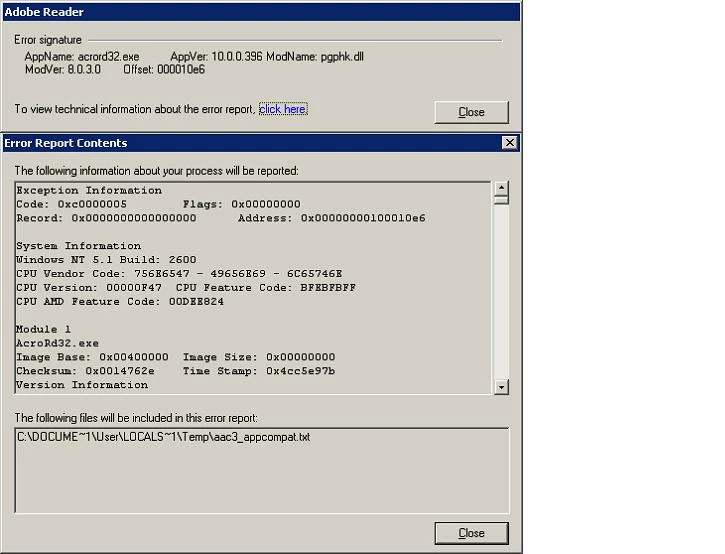
I have now reverted back to Adobe Reader 9.4.0.195.  Will not Adobe Reader X install in Windows XP?

    This topic has been closed for replies.
    Correct answer ParvezGHH

    Having encountering this issue and reading through the responses the best solution would be to use Adobe Readers whitelisting feature.  Below are the steps to follow:

      i.   Add a registry entry enabling the use of whitelisting:
           [HKEY_LOCAL_MACHINE\SOFTWARE\Policies\Adobe\Acrobat Reader\10.0\FeatureLockDown]
           "bUseWhitelistConfigFile"=dword:00000001

      ii.  Create a whitelist file called "ProtectedModeWhitelistConfig.txt" and place it
           in the Adobe Reader executable path i.e. C:\Program Files\Adobe\Reader 10.0\Reader

      iii. The ProtectedModeWhitelistConfig.txt file will need to contain the string
           SECTION_ALLOW_ANY = *PGPhk*

    I have some other information worth checking out on my blog www.greyhathacker.net regarding this issue which might be useful.

    12 replies

    Leaf_MoldAuthor
    Inspiring
    November 21, 2010

    After posting my original message, I downloaded AdbeRdr1000_en_US.exe using my browser at http://get.adobe.com/reader/.  That copy of the installer file has the same SHA1 hashcode as the copy I obtained from the FTP site.  They are the same.

    pwillener
    Legend
    November 21, 2010

    Leaf Mold wrote:

    Will not Adobe Reader X install in Windows XP?

    I don't know the cause of your problem, but just to let you know that I have successfully installed Reader X on several XP systems.