



dress.a
Participant
June 21, 2026
Answered

Installation on macos 12 fails

  • June 21, 2026
  • 2 replies
  • 53 views

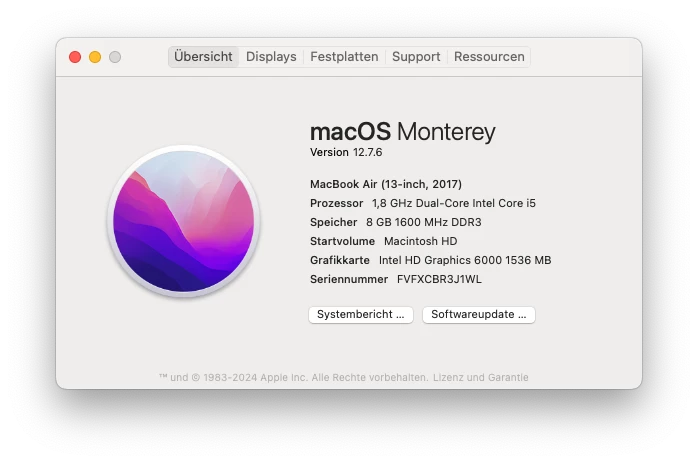
I have a rather old MacBookAir running the latest macOS 12 w/ Adobe Acrobat Reader installed:
Since a few days, trying to update (via the “Help” menu) fails with an error, so I decided to simply re-install it.  Therefore, I downloaded the installation dmg, but running it fails with
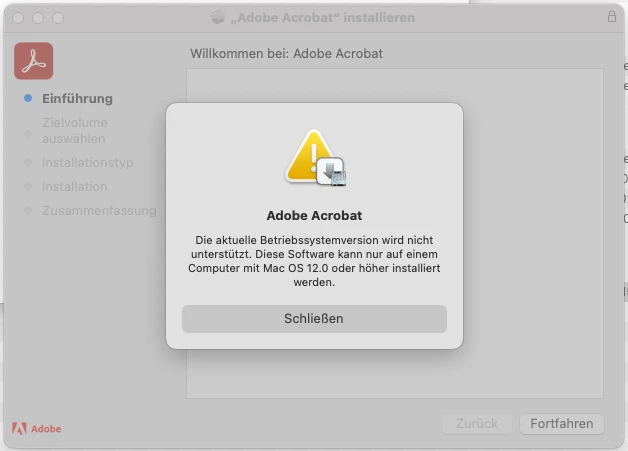
The box is running 12.x… Any idea what goes wrong here?

    Correct answer Tariq Ahmad Dar

    Hello ​@dress.a,


    Thank you for the screenshots and for your patience while we investigated this.


    Version 26.001.21651 of Adobe Acrobat officially dropped support for macOS 12 Monterey as part of its system requirement changes. Since your 2017 MacBook Air is limited to macOS 12.7.6 and cannot be upgraded further, it no longer meets the minimum system requirements for this version of Acrobat. The installer error you are seeing is expected behavior, even though the wording of the error message itself is misleading.

    You can confirm this yourself by visiting the Adobe Acrobat Enterprise Release Notes at:

    https://adobe.ly/3QzJABG

    On that page, scroll down to the System requirement changes section, where you will find the entry for 26.001.21651 listing macOS 12 Monterey as a dropped platform alongside Windows 7 and Windows 8/8.1.


    We are sorry for the inconvenience this has caused and appreciate your understanding.


    ~Tariq

    2 replies

    dress.a
    dress.aAuthor
    Participant
    June 22, 2026

    Thanks for the clarification.  Please note that the download dialogue still states that the Adobe Reader rev. 21662 is suitable for macOS 12

    and that the Technical requirements web page also mentions “macOS 12 or above”:

    which is really misleading.

    Community Manager
    June 23, 2026

    @dress.a - Appreciate the feedback, will have this updated. 

    Tariq Ahmad DarCommunity ManagerCorrect answer
    Community Manager
    June 22, 2026

    Hello ​@dress.a,


    Thank you for the screenshots and for your patience while we investigated this.


    Version 26.001.21651 of Adobe Acrobat officially dropped support for macOS 12 Monterey as part of its system requirement changes. Since your 2017 MacBook Air is limited to macOS 12.7.6 and cannot be upgraded further, it no longer meets the minimum system requirements for this version of Acrobat. The installer error you are seeing is expected behavior, even though the wording of the error message itself is misleading.

    You can confirm this yourself by visiting the Adobe Acrobat Enterprise Release Notes at:

    https://adobe.ly/3QzJABG

    On that page, scroll down to the System requirement changes section, where you will find the entry for 26.001.21651 listing macOS 12 Monterey as a dropped platform alongside Windows 7 and Windows 8/8.1.


    We are sorry for the inconvenience this has caused and appreciate your understanding.


    ~Tariq