
Participant
November 23, 2018
Answered

installazione

  • November 23, 2018
  • 1 reply
  • 832 views

Un bel giorno lanciando Adobe Reader, ho ricevuto un messaggio di errore che terminava con l'invito a installare di nuovo il programma.

Allora sono andato in pannello di controllo, disinstalla un programma, e ho disinstallato la versione che avevo. Poi sono andato su internet e ho scaricato la verisone disponibile. Ho fatto partire la exe di installazione e al termine ecco cosa è stata la risposta:
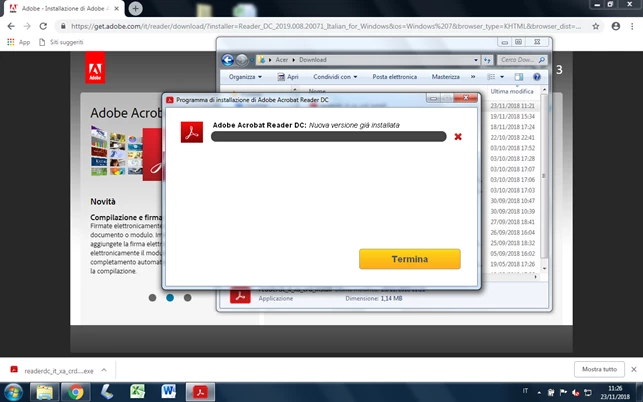
Cosa ho sbagliato? Cosa posso fare per installare il programma di nuovo correttamente? GRAZIE!

This topic has been closed for replies.
Correct answer AnandSri

Hello Enricodg,

I am sorry for the delayed response and inconvenience caused. On which operating system are you on? If you are on Windows 7, make sure that you have the OS above the version of Windows 7 Service Pack 1. Please install all the mandatory updates including Service pack updates for the OS and reboot the machine.

You may also refer and try the suggestion from Error 1722 with Windows installer package of Acrobat DC

Also, update for C runtime in Windows, refer to the following URL for obtaining the Windows update https://support.microsoft.com/en-in/help/2999226/update-for-universal-c-runtime-in-windows

Reboot the machine and try installing Adobe Reader Adobe - Adobe Acrobat Reader DC Distribution

Let us know if you experience any issue.

Thanks,

Anand Sri.

1 reply

Community Manager
November 28, 2018

Hi enricodg47,

You may download the standalone Reader installer using this link: Adobe - Adobe Acrobat Reader DC Distribution once the setup is downloaded make sure your machine doesn't have any leftover fragments on it. You may use Acrobat Cleaner tool: Download Adobe Reader and Acrobat Cleaner Tool - Adobe Labs If need be, try restarting the machine before you install it again.

-Tariq Dar

Participant
November 28, 2018

Sorry Tariq, I followed your suggestion and ran the cleaner first. Then I restarted the computer and started the installation but it stopped with this message:

Is there another chance?

Thank you.

AnandSri
Community Manager
AnandSriCommunity ManagerCorrect answer
Community Manager
December 12, 2018

Hello Enricodg,

I am sorry for the delayed response and inconvenience caused. On which operating system are you on? If you are on Windows 7, make sure that you have the OS above the version of Windows 7 Service Pack 1. Please install all the mandatory updates including Service pack updates for the OS and reboot the machine.

You may also refer and try the suggestion from Error 1722 with Windows installer package of Acrobat DC

Also, update for C runtime in Windows, refer to the following URL for obtaining the Windows update https://support.microsoft.com/en-in/help/2999226/update-for-universal-c-runtime-in-windows

Reboot the machine and try installing Adobe Reader Adobe - Adobe Acrobat Reader DC Distribution

Let us know if you experience any issue.

Thanks,

Anand Sri.