


Internet Explorer freezes when viewing embedded PDFs following Adobe Reader update
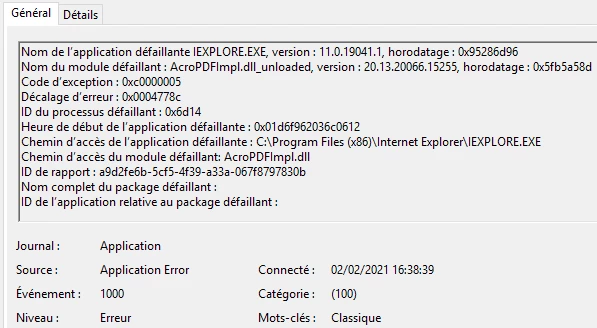
It happens since october and an Adobe Reader DC update with 2020.013.20064 version.
We can use another browser because that's the only browser that works with company website.
It appears to be inconsistent but be can repoduce the issue when opening 10 or 20 PDF.
The 2020.013.20064 is related to pb with IE : https://borncity.com/win/2020/11/13/adobe-reader-dc-sicherheitsupdate-nov-2020-verursacht-probleme-unter-sap/
Adobe Reader uses 30% of CPU => IE freeze and we have to kill Adobe Reader process in the Task Manager.
When we reopen the PDF file that crashed, it is systematicaly correctly displayed in IE.
We tried many things :
Uninstall Adobe Reader and install an older version like 2020.006.20034 or 20.012.20048.
We tested with the last version 2020.013.20074
Test with a new win10 with 20.012.20048
Restarting PCs, the issue may happen few minutes after a reboot
I recorded a DUMP file via Task Manager (127 MB) I can share if needed
We modified registry keys :
- bProtectedMode = 1
- FeatureLockDown = 0
We ran Repair Installation in Adobe Reader
the Adobe PDF browser add-on in Internet Explorer is enabled
IE version = 11.778.18362.0
Any idea welcome 🙂
Thanks
KR
 AdChoices