
Inspiring
Nov 24, 2026 1:10 PM UTC
Answered

Invalid signatures after Adobe Reader update (26.003.22110)

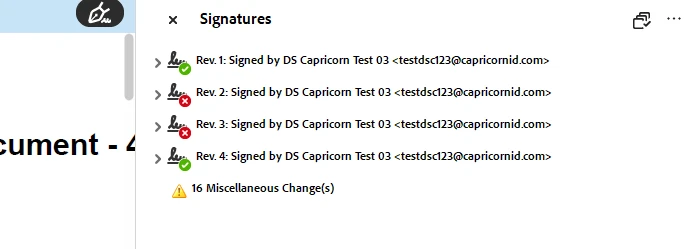
Since Adobe Acrobat updated from 26.002.22031 to 26.003.22110, PDFs with multiple digital signatures no longer validate correctly.


The pattern is the same every time:

- PDF with 4 signatures (one per page): signatures 1 and 4 are valid, signatures 2 and 3 show a red cross (invalid).

- PDF with 10 signatures: signatures 1 and 10 are valid, signatures 2 to 9 are invalid.

- So only the first and the last signature validate; every signature in between is marked invalid, and the whole document shows as invalid.


The same PDF files show all signatures as valid in Acrobat 26.002.22031. Nothing was changed in the documents - only Acrobat was updated.

Important: the problem only happens when the pages are signed by automation, i.e. when a PDF signing tool signs multiple pages of one PDF one after another. It happens with every automated PDF signing tool we have tried. If each page of the same PDF is signed manually, one page at a time, all signatures validate correctly in 26.003.


What I have found:

- This update replaced both signature modules: plug_ins\DigSig.api and plug_ins\PPKLite.api (26.2.22031 to 26.3.22110). The bundled OpenSSL library also changed (3.5.8 to 3.5.9).

- If I copy only DigSig.api and PPKLite.api from 26.002.22031 into the 26.003.22110 installation, all signatures validate again. So the change appears to be in Acrobat's signature validation (revision / modification detection), not in the PDFs.

- The release notes for 26.003.22075 and 26.003.22110 do not mention any change to signature validation.

- Other users report the same problem since the 2 November 2026 update (26.003.22075): https://community.adobe.com/questions-9/since-the-2-november-2026-update-digital-signatures-on-1-2-random-pages-of-a-10-page-pdf-are-showing-invalid-red-cross-marks-while-others-remain-valid-please-roll-back-the-update-or-provide-a-permanent-fix-1656394


Questions:

1. Is this a known regression in 26.003, and when will it be fixed?

2. If Acrobat 26.003 now intentionally treats something between the signed revisions as a disallowed change, what exactly is it? Then we can correct how our PDFs are signed.


I can share a sample PDF (with confidential data removed) with the engineering team.
    ⠀MG⠀Correct answer
    Inspiring
    Nov 25, 2026 3:59 PM UTC

    Dear ​@Playful_problem35af ,


    I understand the pressure - we were in the same situation. Adobe (Meenakshi Negi) has confirmed in this thread that it is a known issue the team is addressing, and that there is no problem with the signatures themselves. She suggested a temporary registry setting, and it fixed it for us: all signatures show valid again in Acrobat 26.003.


    Steps:

    1. Close Acrobat completely (also check Task Manager that no Acrobat process is running).

    2. Back up the key first. Open Command Prompt and run:

    reg export "HKCU\Software\Adobe\Adobe Acrobat\DC\Security\cDigSig" "%USERPROFILE%\Desktop\cDigSig_backup.reg"

    (If it says the key was not found, there is nothing to back up.)

    3. Apply the setting:

    reg add “HKCU\Software\Adobe\Adobe Acrobat\DC\Security\cDigSig” /v bSigAppearanceIntegrity /t REG_DWORD /d 0 /f

    4. Reopen Acrobat, open the PDF and click Validate All in the Signatures panel.


    As a one-click option, save the following text in Notepad as Apply_Fix.reg and double-click it:


    Windows Registry Editor Version 5.00


    [HKEY_CURRENT_USER\Software\Adobe\Adobe Acrobat\DC\Security\cDigSig]

    "bSigAppearanceIntegrity"=dword:00000000


    Notes:

    - It applies per Windows user, so every user who validates these PDFs needs it. Your IT team can deploy it to everyone.

    - It is temporary. Remove it once Adobe releases the fix:

    reg delete "HKCU\Software\Adobe\Adobe Acrobat\DC\Security\cDigSig" /v bSigAppearanceIntegrity /f


    Hope this helps you meet your deadline.


    MG

    16 replies

    Participant
    Nov 26, 2026 10:57 AM UTC

    Any news on this?

    Bug i s reproducibile in a very trivial way...are you still waiting for user’s samples?

    I cant’ believe it...

    Translate
    ⠀MG⠀Author
    Inspiring
    Nov 26, 2026 10:59 AM UTC

    Hi Daniele,


    Adobe has confirmed this is a known issue and the team is working on a fix. Until then, a temporary registry setting fixed it for me. You can try this .reg file:

    https://limewire.com/d/sjtk7#IIDTDqWylu


    Close Acrobat completely, download the .reg file, double-click it and allow it to merge into the registry, then reopen Acrobat and validate the PDF again. It applies per Windows user and should be removed once Adobe releases the fix.


    Let me know if it works for you.

    Thanks

    MG

    Translate
    ⠀MG⠀Author
    Inspiring
    Nov 27, 2026 7:28 AM UTC

    Link to download reg file to fix the issue.

    https://drive.google.com/file/d/1Z3kuCaxaTV3aqSK_JIB177pxBucUrqOJ/view?usp=sharing

    Please let me know if this fix your issue.

    Thanks

    MG

    Translate
    Participating Frequently
    Nov 26, 2026 9:53 AM UTC

    ​@PriyankaVishwakarma ​@Meenakshi Negi  Any indicative timeline for the resolution?


    Translate
    Meenakshi Negi
    Community Manager
    Community Manager
    Nov 26, 2026 10:48 AM UTC

    Hi meenakshi_3434,


    Please refer to the information shared to your question in this community post: 

    We request that you add comments only in one place, as it avoids confusion.


    Thanks,

    Meenakshi

    Translate
    Participant
    Nov 25, 2026 3:19 PM UTC

    We are having the same issue at our organization and have serious deadlines to meet by next week. I cannot believe the money our organization is paying for this application for it to suck so bad and for the amount of money that people get paid who work for Adobe cannot fix this problem. All companies need a big refund for this screw up while they are asking us for their monthly payments.  I cannot wait to get rid of this application within the next couple of months and replace it with a new one.

    Translate
    ⠀MG⠀AuthorCorrect answer
    Inspiring
    Nov 25, 2026 3:59 PM UTC

    Dear ​@Playful_problem35af ,


    I understand the pressure - we were in the same situation. Adobe (Meenakshi Negi) has confirmed in this thread that it is a known issue the team is addressing, and that there is no problem with the signatures themselves. She suggested a temporary registry setting, and it fixed it for us: all signatures show valid again in Acrobat 26.003.


    Steps:

    1. Close Acrobat completely (also check Task Manager that no Acrobat process is running).

    2. Back up the key first. Open Command Prompt and run:

    reg export "HKCU\Software\Adobe\Adobe Acrobat\DC\Security\cDigSig" "%USERPROFILE%\Desktop\cDigSig_backup.reg"

    (If it says the key was not found, there is nothing to back up.)

    3. Apply the setting:

    reg add “HKCU\Software\Adobe\Adobe Acrobat\DC\Security\cDigSig” /v bSigAppearanceIntegrity /t REG_DWORD /d 0 /f

    4. Reopen Acrobat, open the PDF and click Validate All in the Signatures panel.


    As a one-click option, save the following text in Notepad as Apply_Fix.reg and double-click it:


    Windows Registry Editor Version 5.00


    [HKEY_CURRENT_USER\Software\Adobe\Adobe Acrobat\DC\Security\cDigSig]

    "bSigAppearanceIntegrity"=dword:00000000


    Notes:

    - It applies per Windows user, so every user who validates these PDFs needs it. Your IT team can deploy it to everyone.

    - It is temporary. Remove it once Adobe releases the fix:

    reg delete "HKCU\Software\Adobe\Adobe Acrobat\DC\Security\cDigSig" /v bSigAppearanceIntegrity /f


    Hope this helps you meet your deadline.


    MG

    Translate
    Participant
    Nov 25, 2026 3:03 PM UTC

    Same here

    After the recent Acrobat/Reader update, PDFs whose visible signature appearances contain the legacy Acrobat 6 layers (/n1, /n3, /n4 alongside /n0 and /n2) report "changes made after signing".

    On some of these files the earlier signatures are reported as invalid when a third signature is added. The same documents signed with appearances that contain only /n0 and /n2, as in PDF/A mode, validate with no changes reported. Earlier Reader versions validated both variants without issues. The signatures are cryptographically valid in every case; the problem is only in Acrobat's modification analysis.

    Technical details

    • Base document: tagged PDF 1.7 (/StructTreeRoot, /MarkInfo) with pre-existing empty signature fields. Every signature is added as an incremental update.
    • Signatures: /Filter /Adobe.PPKLite, /SubFilter /ETSI.CAdES.detached. For test purposes the /Reason contains Cyrillic text, and the appearance text uses an embedded custom font (Type0/Identity-H, subset).
    • Appearance structure: /AP /N → /FRM → /n0 … /n4. Content of each layer:
      • /n0: % DSBlank
      • /n1: % DSUnknown plus the standard question-mark graphic
      • /n2: signature text and image
      • /n3: empty stream
      • /n4: "Signature not verified" text
    • We compared two files with the same signing sequence, the same revisions, the same Catalog and the same AcroForm. The only difference is the 7 objects per signature that make up the /n1, /n3, /n4 layers and their resources. The file with the layers fails and the file without them passes.
    • The modification report lists entries such as /Catalog /StructTreeRoot … /Annots <widget> /V, /DR and /AP with action "CREATION". These are the normal objects created by each signature, reached through the structure tree path. The structure tree itself is not modified in any revision.

    Test matrix

    1. Two signatures with only /n0 and /n2 (legacy layers OFF): valid, no changes reported.
      • Third signature with only /n0 and /n2: validation OK.
    2. Two signatures with /n0, /n1, /n2, /n3, /n4 (legacy layers ON): signatures valid, but 8 changes reported.
      • Third signature with only /n0 and /n2, applied with Adobe Reader: validation KO, the second signature becomes invalid.
      • Third signature with only /n0 and /n2, applied with our signing client: validation KO, the second signature becomes invalid.
      • Third signature with all five layers, applied with our signing client: validation KO, the second signature becomes invalid.

    Questions

    1. Did a recent Acrobat/Reader release change how signature appearances with the legacy /n1, /n3, /n4 layers are handled during validation or modification detection? If so, which version, and is it documented?
    2. Is it expected that such appearances are reported as changes, or that they cause an earlier signature to be invalidated when a later signature is added, even when the later signature appearance has no legacy layers?
    3. Is the recommended practice now to generate only /n0 and /n2, as the Acrobat 6+ guidance suggests? Is there a supported way to keep documents already signed with legacy layers validating correctly?

    Sample files reproducing the issue can be provided on request, after removing personal data

    Translate
    Participating Frequently
    Nov 26, 2026 11:18 AM UTC

    ​@Meenakshi Negi You had asked for the documents in the other thread but they are available here.


    I have been able to confirm that the issue is occurring because the legacy layers are being identified as modifications to the PDF.

    In my testing, the signatures validated successfully once the legacy layers were removed.

    However, the documents that have already been signed continue to exhibit the same issue, as they still contain the Acro6 layers.

    This suggests that the issue is related to how these legacy layers are being handled during signature validation.

    Can you team work on these lines?

    Translate
    Participating Frequently
    Nov 25, 2026 9:12 AM UTC

    We are seeing a very similar and reproducible issue.

    Our results with the exact same PDF files are:

    • Acrobat 26.002.22031: all signatures validate correctly.
    • Acrobat 26.003.22075: previous signatures become invalid.
    • Acrobat 26.003.22110: the issue is still present.

    Our PDFs contain multiple PAdES signatures added sequentially through an automated remote signing process.

    We also tested the individual incremental revisions. The pattern is:

    • Revision 1: Signature 1 valid
    • Revision 2: Signature 1 invalid, Signature 2 valid
    • Revision 3: Signatures 1–2 invalid, Signature 3 valid
    • Revision 4: Signatures 1–3 invalid, Signature 4 valid

    The Signatures panel also shows “Miscellaneous Change(s)”.

    We checked the affected files with QPDF and the EU DSS Validator. QPDF reports no syntax or stream errors, while DSS reports the signatures as structurally valid and cryptographically intact (SignatureValid=true, SignatureIntact=true, DataIntact=true, valid ByteRanges). DSS does detect modifications between the incremental revisions.

    We also found no DocMDP, FieldMDP or field-lock restriction that would prohibit subsequent signatures.

    So our observations are very similar: the problem starts with 26.003, and the previous signature becomes invalid after the next incremental signing revision is added.

    Translate
    Participating Frequently
    Nov 25, 2026 7:09 AM UTC

    We are seeing a very similar and reproducible issue.

    Our results with the exact same PDF files are:

    • 26.002.22031: all signatures validate correctly.
    • 26.003.22075 and 26.003.22110: previous signatures become invalid.

    Our PDFs contain multiple PAdES signatures added sequentially through an automated remote signing process.

    We also tested the individual incremental revisions. The pattern is:

    • Revision 1: Signature 1 valid
    • Revision 2: Signature 1 invalid, Signature 2 valid
    • Revision 3: Signatures 1–2 invalid, Signature 3 valid
    • Revision 4: Signatures 1–3 invalid, Signature 4 valid

    The Signatures panel also shows “Miscellaneous Change(s)”.

    We checked the affected files with QPDF and the EU DSS Validator. QPDF reports no syntax or stream errors, while DSS reports the signatures as structurally valid and cryptographically intact (SignatureValid=true, SignatureIntact=true, DataIntact=true, valid ByteRanges). DSS does detect modifications between the incremental revisions.

    We also found no DocMDP, FieldMDP or field-lock restriction that would prohibit subsequent signatures.

    So our observations are very similar: the problem starts with 26.003, and the previous signature becomes invalid after the next incremental signing revision is added.

    We are currently also trying to determine which specific modification Acrobat 26.003 classifies differently from 26.002.

    Translate
    ⠀MG⠀Author
    Inspiring
    Nov 25, 2026 3:03 AM UTC

    Hello ​@PriyankaVishwakarma  and ​@Meenakshi Negi ,


    Thank you for looking into this. Meenakshi, I'm including you because you are following the same issue in the other thread.


    Sample PDF: it is already attached to my question above (Dummy_4_Pages_WebeSign_signed.pdf).


    Video: for your reference, please see the other user's post that I linked in my question. It contains a video and the same kind of document, and shows exactly the same behaviour:

    https://community.adobe.com/questions-9/since-the-2-november-2026-update-digital-signatures-on-1-2-random-pages-of-a-10-page-pdf-are-showing-invalid-red-cross-marks-while-others-remain-valid-please-roll-back-the-update-or-provide-a-permanent-fix-1656394


    Here are our findings from analysing the attached PDF, which may help the engineering team:


    1. All 4 signatures are cryptographically valid and intact (SHA-256), and each covers its complete revision. The cross-reference tables of all 5 revisions (original + 4 signatures) are correct.

    2. Each signing revision only adds the new signature field and its widget, adds the widget to that page's /Annots, updates /AcroForm /Fields and updates /ModDate in the document info. An independent validator (pyHanko) classifies every change after each signature as allowed (adding further signatures only).

    3. In Acrobat 26.003 the Signatures panel shows "16 Miscellaneous Change(s)" for this file. Acrobat 26.002.22031 shows all 4 signatures as valid with the same file.

    4. The difference compared with PDFs signed manually in Acrobat: the automated tool (iTextSharp based) builds each signature appearance with the legacy Acrobat 6 "dynamic signature appearance" layers - FRM with layers n0 to n4, where n1 is the "DSUnknown" question-mark layer and n4 contains the text "Signature Not Verified". Each widget also has its own /DR entry, and /AcroForm /DR contains /XObject /FRM.

    5. "16" could correspond to 4 signatures x 4 of these replaceable layers, so it looks like 26.003 has started to treat these legacy dynamic appearance layers as modifications made after signing.


    Could the engineering team please confirm whether this change is intentional? Many automated signing tools still produce these layers, so a large number of existing signed documents are affected.


    Thank you.

    Translate
    Meenakshi Negi
    Community Manager
    Community Manager
    Nov 25, 2026 4:35 AM UTC

    Hi ⠀MG⠀,


    Thank you for sharing all this information.

    This is a known issue that the team is addressing. However, there are no problems with the signatures.

    In the meantime, if you wish, you may try the following registry settings. Please back up the current registry settings and save them locally before making changes.

    Computer\HKEY_CURRENT_USER\Software\Adobe\Adobe Acrobat\DC\Security\cDigSig

    bSigAppearanceIntegrity=0 (REG_DWORD)


    Let us know if that helps.


    Thanks,

    Meenakshi

    Translate
    PriyankaVishwakarma
    Community Manager
    Community Manager
    Nov 24, 2026 2:53 PM UTC

    Hello@MG,


    Thank you for reaching out to us and sharing the detailed information. We understand that you're experiencing an issue in which digital signatures on certain pages are marked as invalid after updating to Acrobat 26.003.22110. We have already shared the reported behaviour with our engineering team, and they are currently investigating it.


    To assist with the ongoing investigation, could you please provide the following:


    1. A sample PDF that reproduces the issue, with all confidential or sensitive information removed.

    2. A short video recording showing the issue as it occurs, including the steps leading up to the invalid signature status.

    Note: Before sharing any files or recordings, please ensure that all confidential workplace, personal, or sensitive information has been removed or obscured.

    Once we receive these details, we will add them to the engineering investigation and keep you informed of any updates we receive from the team.


    Thank you for your cooperation and patience.


    Regards,

    ^PV

    Translate