


Inspiring
October 27, 2021
Answered

Is is possible to customize signature appearance?

  • October 27, 2021
  • 2 replies
  • 870 views

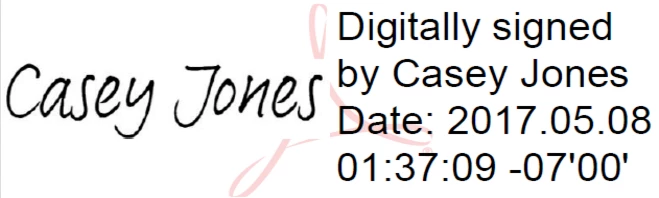
I am using Acrobat to digitally sign documents using a qualified certificate. I am using a scan of my signature to add the right visual feel to it instead of having my name machine written. In the right side of the signature, I am displaying the date and time of signing. Is it possible to customize/adjust the size of the date, and maybe move it below the signature instead of having it on the right? 
 

This topic is closed to new replies. Start a new post to keep the conversation going.
Correct answer korax1989

In the end, I have chosen to use the digital signature without the text details, so it displays only the scan of the signature. I then add the machine-written name and date of signing using a dynamic stamp. 

2 replies

korax1989AuthorCorrect answer
Inspiring
October 29, 2021

In the end, I have chosen to use the digital signature without the text details, so it displays only the scan of the signature. I then add the machine-written name and date of signing using a dynamic stamp. 

try67
Community Expert
Community Expert
October 27, 2021

No, that's not possible. You can only customize which fields appear in the signature, not their locations or formatting.