
Is it normal for Acrobat Updater to open command prompt randomly?
To whoever it may concern,
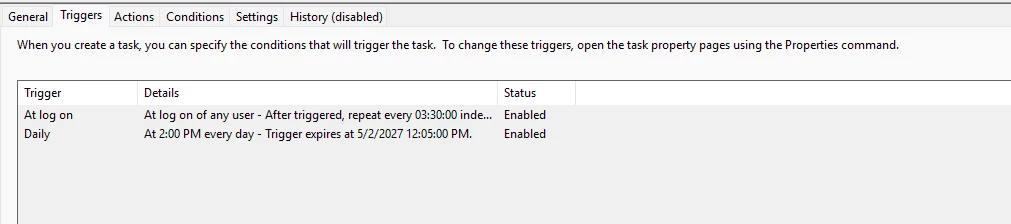
While I was working on my other monitor, I suddenly saw a command prompt window pop up and then disappear immediately. I went to check the "Task Scheduler" application, and it said that the last thing that ran was an Adobe Acrobat updater. This happened at approximately the same time I saw the window pop up. I checked the triggers, and it says it only triggers at 2:00 PM Everyday but the pop-up appeared at 1:39 PM. The only other trigger says "At log on - after triggered repeat every 03:30:300 indefinitely," which I'm unsure if it caused the pop-up to appear. I unfortunately couldn't get a picture of the command prompt window as it disappeared way too fast, and I don't have a screen recording that I can look back on. I'm unsure if I'm just being a bit too paranoid or if this is just normal. I recently got hacked, and I'm starting to notice a lot of small details I previously hadn't noticed before. I have disabled the task for the time being until I am sure this is what caused the window to appear. The screenshots I have provided are of the task that I suspect caused the window.




 AdChoices