
monidipas465937
Participant
May 23, 2017
Question

Issue in PDF search

  • May 23, 2017
  • 2 replies
  • 745 views

Hi,

We have an issue with a pdf document published using one of our tools. In this particular document, search is not working properly. Below are the screenshots of the issue. To reproduce the problem, you can simply search for the string "AUX_CLK_IN" and see that the search results show only 1 output whereas the string is present twice in the page.
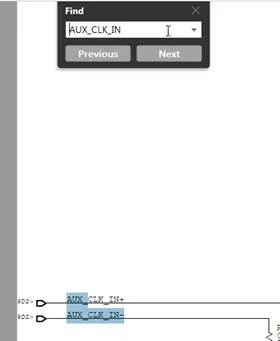
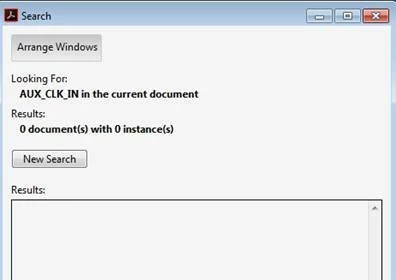
Could you please let us know why this is happening and what tools one can possibly use to find out details in the document to debug the issue.

P.S.  I could not find a way to attach the sample pdf file, need help regarding the same.

Regards

Monidipa Sarkar

    This topic has been closed for replies.

    2 replies

    monidipas465937
    Participant
    June 2, 2017

    How do I find out what is exactly wrong with the document. Also if there is an issue with how this file is generated, how is it working is other readers?

    try67
    Community Expert
    Community Expert
    June 2, 2017

    - It has to do with the internal structure of the file. It's not so easy to find out exactly what is wrong. It would require analyzing the file in depth.

    - I can't answer the second question. It's possible these applications fix the issues with the file behind the scenes, or simply ignore them.

    monidipas465937
    Participant
    June 7, 2017

    Hi,

    So I got a suggestion that - " the search issue seems to stem from the “-“ at the end of the "AUX_CLK_IN-" text run,which is apparently interpreted by the APDFL (and Acrobat?) Wordfinder as indicating a hyphen with the next text run, which is "AUX_CLK_IN+", even though it is physically placed on the page above the previous textrun.

    There are a couple of possible work-arounds that come to mind. On the search-side, you may want to turn off  hyphen detection by setting noHyphenDetection in the WordFinder parameters to true."

    Can anyone tell me how to turn off hyphen detection by setting noHyphenDetection in the WordFinder parameters to true using the Adobe reader settings/UI ?

    Regards

    try67
    Community Expert
    Community Expert
    June 2, 2017

    It seems like this is a scanned document that was later OCRed. The results of an OCR process are rarely perfect. That is most likely what you're seeing here. The OCR process was able to recognize some of the text, but not all, and possibly not in the right location.

    monidipas465937
    Participant
    June 2, 2017

    Well,this is not a scanned document. This document is created using Cadence Allegro DEHDL tool to export schematic drawing to a pdf format.

    Also the search works fine when I use another reader such as FoxIt Reader, then why doesn't it work in Adobe Reader. Also ss there a way to attach the pdf here?

    Regards

    try67
    Community Expert
    Community Expert
    June 2, 2017

    No, not directly. You need to upload it to something like Dropbox, Google Drive, Adobe Cloud, etc., and then post the link to it here.