
Known Participant
May 25, 2017
Question

Issue to add reference Adobe Reader File Preview Type Library to Visual Studio 2017

  • May 25, 2017
  • 6 replies
  • 6097 views

Hi All.

I have installed on my computer Acrobat Reader DC and Visual Studio 2017. And I would like to embedded Acrobat Reader to project of Visual Studio 2017. But when I tried to add reference Adobe Reader File Preview Type Library to project I got error message:
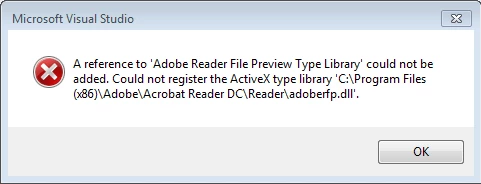
How to fix that issue?

Thanks.

    This topic is closed to new replies. Start a new post to keep the conversation going.

    6 replies

    Legend
    May 27, 2017

    That library comes with Acrobat Reader but it's written for VB. There seems to be some kind of conversion layer for .net users to use VB components but I don't know anything about that except that involves the programmer making an interop file.

    Legend
    May 26, 2017

    So, have you read the relevant part of the SDK? In particular, how did you choose that library?

    eugzlAuthor
    Known Participant
    May 26, 2017

    When I tried to add reference I open Reference Manager of VS 2017 and selected that library. But actual searching online I though I need AxAcroPDFLib.AxAcroPDF library. If so how to get it and embedding to WPF project?

    Thanks.

    Legend
    May 26, 2017

    Which documented interface in the Acrobat SDK are you trying to use? This does not sound like one.

    eugzlAuthor
    Known Participant
    May 26, 2017

    Thanks for replay.

    I would like to open multi-pages PDF file in Acrobat Reader in WPF VB Window of VS 2017 project.

    Adorobat
    Participating Frequently
    May 26, 2017

    Hi eugzl,

    Please refer to the following links discussing the same topic:

    Which C# Adobe library should I use to open a PDF in Acrobat Reader 9, 10, and 11?

    Thanks,

    Shivam