
luish90606347
Participant
August 13, 2018
Question

Issue when trying to login into Box account from Adobe Reader DC

  • August 13, 2018
  • 2 replies
  • 1078 views

Hi!

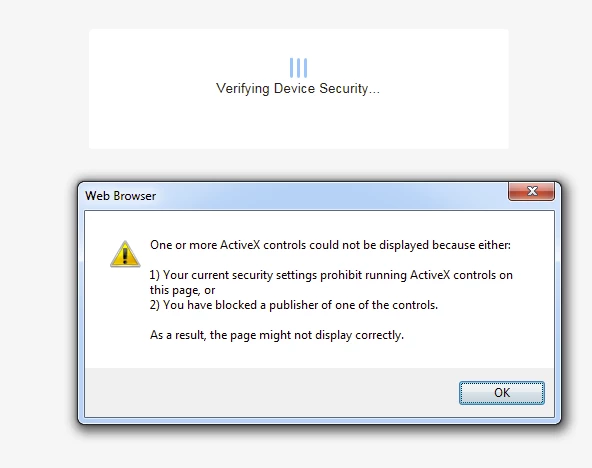
When I want to add a Box account in Adobe Reader DC, in some cases (Device Trust enabled in Box account + Box Tools installed) the login page has to redirect you to another web page which attempts to load an ActiveX control. It seems the Adobe Reader’s embedded web browser which loads the web pages is not able to run ActiveX controls, thus making the login request fail.
Adobe Acrobat Reader DC Version 2018.011.20055

The login in Internet Explorer is working fine.

Could you check that, please?

Regards,

Luis.

    This topic has been closed for replies.

    2 replies

    AnandSri
    Legend
    November 20, 2018

    Hi Tony!

    I am sorry for the delayed response, are you still experiencing the issue or have you found a solution. Have you tried with the latest patch available of Adobe Reader?

    Download and install the latest patch and check DC Release Notes — Release Notes for Acrobat DC Products

    Thanks,

    Anand Sri.

    AnandSri
    Legend
    August 14, 2018

    Hello Luis,

    We're sorry for the trouble you had while adding Box account in Adobe Reader, please Sign out from Adobe Reader, reboot the machine, sign back in Adobe Reader and then repair Adobe Reader from help>repair installation.

    Check for any pending updates of Adobe Reader from help>check for updates, reboot the machine after updating Adobe Reader and try adding the Box account again.

    Have you tried adding any other cloud storage account? If not, try and see if the issue is reproducible with other cloud storage account.

    You can also refer to the Adobe article Access your Box files in Acrobat/Reader

    If the issue persists, remove Adobe Reader using Acrobat cleaner tool Download Adobe Reader and Acrobat Cleaner Tool - Adobe Labs

    Reboot the machine and install the latest version of Adobe Reader from Adobe - Adobe Acrobat Reader DC Distribution

    let us know how it goes and share your observation.

    Thanks,

    Anand Sri.

    Participant
    September 4, 2018

    Hi, I have installed Adobe Acrobat Reader DC Version 2018.011.20058 and am still getting this issue.

    I am trying to access Box and get the below error message

    This issue only happens when box requires the end user to go through device trust checks. Device Trust - Overview

    In order for device trust to run the browser we require the use of a Box Tools ActiveX Add-on set in IE which I believe due to the nature of the pop up does not allow this to run. More on this can be found here

    Understanding System Requirements to Install Box E... - Box

    Are you able to advise if there is any reg keys or work-around that will allow the pop up to access the active x plug in?

    Regards

    Tony

    AnandSri
    Legend
    September 19, 2018

    Hello Tony,

    We're sorry for the delayed response and inconvenience caused. Is it a managed computer i.e. it is an office computer or a personal computer?

    It seems that the ActiveX control is not getting called and this is the reason you are getting the error message.

    Create a test user profile with full admin rights or enable the hidden admin account and check. Let us know how it goes.

    Thanks for your time and patience thus far.

    Regards,

    Anand Sri.