


Participant
March 16, 2021
Question

Issue with PDF showing unreadable in Adobe Reader but looks fine in Chrome

  • March 16, 2021
  • 1 reply
  • 3070 views

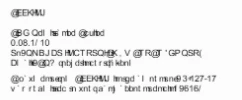
I have a PDF that shows unreadable (random characters in PDF) in Adobe Reader but looks fine in Chrome.


This is only happening to 1 person.  If I view it in Adobe Reader it looks fine.   Both machines running current version of Adobe Reader and have even uninstalled and reinstalled Adobe Reader on the machine where it looks unreadable.


snippit of what the PDF looks like on users screen:


This topic has been closed for replies.

1 reply

Amal.
Legend
March 17, 2021

Hi Jes


Hope you are doing well and sorry for the trouble. As described the the PDF is un-readable in one of the user machine and displays fine on your computer also it displays well in chrome.


It seems to be the font issue as the required font is not installed on the user machine the pdf is not being displayed properly. Also, web browsers use their own PDF mechanism to display and render the PDF and they are not Adobe dependant.


Please ask the user to try the following steps and see if that helps.

Go to Edit (Win), Adobe Acrobat (Mac) > Preferences > Page Display > Rendering > Select 'Use Local Fonts' Click Ok and see if that works.


Let us know how it goes


Regards

Amal

Jes5E85Author
Participant
March 17, 2021

I have tried that and the user already had that option checked.  Also I think I stated if I open the file on my computer it displays just fine in Adobe.

Amal.
Legend
March 18, 2021

Hi there


We are sorry to hear that. Would you mind sharing the PDF file with us so that we can check it at our end. For info about sharing the PDF please check the help page: https://helpx.adobe.com/document-cloud/help/sharing-pdfs.html


Regards

Amal