


Participant
December 29, 2020
Question

Issues with free version trying to open embedded files

  • December 29, 2020
  • 3 replies
  • 2629 views

Hi there,

I just download the latest free version of the Adobe Acrobat Reader DC. I know the reader is capability of opening embedded files. I was able to do this a while back where I created a word doc with a object PDF file, converted this word doc into PDF so it's a PDF file within a PDF. 


I'm not sure if it's just the free version but I can't open those embedded files. It doesn't show up on the left side panel under the attachments tab (the one with the paperclip).  
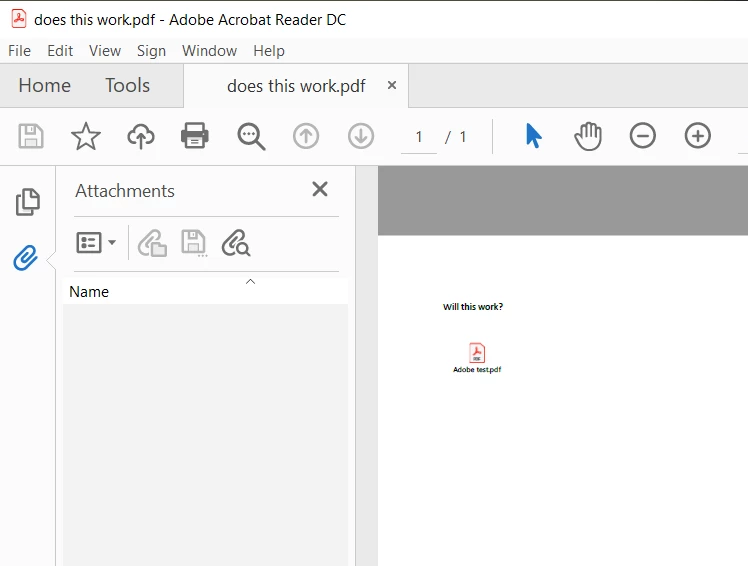
I've also looked at the registry but those extensions are on the white list (or i could be wrong). So i just wanted to know is it because i have the free version?


I've attached a test file to help show what i'm trying to do. 


Thanks!

    This topic has been closed for replies.

    3 replies

    Participant
    December 30, 2020

    OK I will do thank you 

    try67
    Community Expert
    Community Expert
    December 29, 2020

    It's not a real attachment. If it once was then the file was flattened at some point, which caused it to be lost.

    R5C62Author
    Participant
    December 29, 2020

    Hey try67, thanks for answering, I really appreciate it! Is it flattened because of the file type went from word document saved as PDF or was it a setting from word? Or was it always like that, where the pdf file that was placed into word document, gets flatten when the word document is saved as a pdf. 


    For example:

    I create a word document with the following information : "Results show this design is great, inset pdf file of data (graphs of whatever). In conclusion of the report.. ", have the word document save as - PDF. i didn't see any options to keep attachments.

    If it always flattens any object/embedded/attached file in the word document saved as PDF then my memory had served me wrong. For some reason I remembered I was able to do that but I might have mixed that up with attaching the pdf to word and opening it from there. 

    Thanks!

    Bernd Alheit
    Community Expert
    Community Expert
    December 29, 2020

    You can attach files with Adobe Acrobat.

    Bernd Alheit
    Community Expert
    Community Expert
    December 29, 2020

    The document doesn't have any attachment.