
Participant
February 7, 2018
Answered

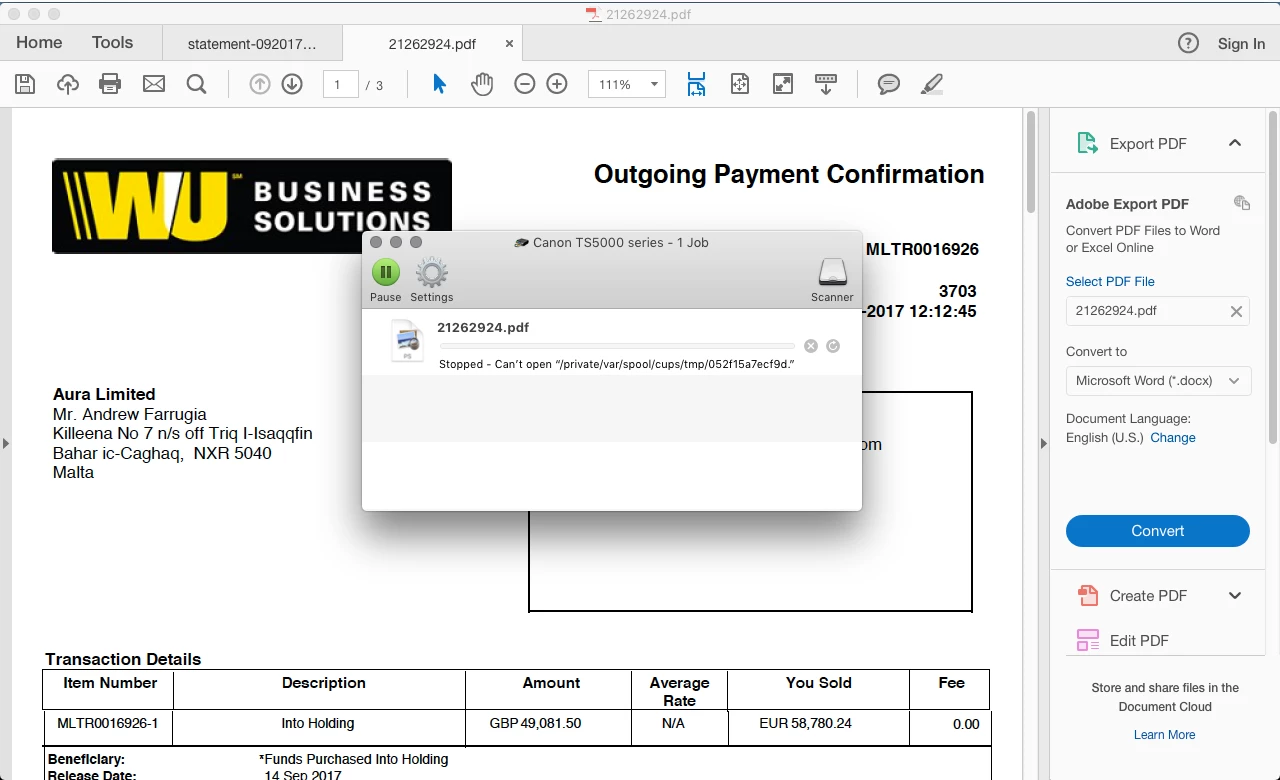
mac print error with reader - stopped cant open private var spool cups

  • February 7, 2018
  • 2 replies
  • 1209 views

hi i have MBP with sierra 10.13.1 and installed adobe pdf reader - and updated - to latest version. I also have office for mac 2016 - so i generate pdf s for work and when i go to print - on my canon ts5050 .  . i get this error. Also if i send the pdf generated to my customers - they can view - but can not print them either - please help Thanks Andrew   help.
    This topic is closed to new replies. Start a new post to keep the conversation going.
    Correct answer AkanchhaS8194121

    Hi Drewmalta,

    Thanks for sharing the screenshot.

    You may check the following workaround to see if that helps you solving the problem-

    • Check the files security settings, Open the document>Right Click "Document Properties"> Security> Check whether Printing is allowed for this document or not?
    • Save the file to a different location than where it is saved actually, Open file>File> Save As> Choose diff. location.
    • Check with any other file, if you get the same error then refer to the help document - Troubleshoot PDF printing in Acrobat and Reader and try the steps suggested.

    Hope this helps.

    Regards,

    Akanchha

    2 replies

    brent1950
    Participating Frequently
    December 2, 2018

    Does't work!

    AkanchhaS8194121
    AkanchhaS8194121Correct answer
    Legend
    February 7, 2018

    Hi Drewmalta,

    Thanks for sharing the screenshot.

    You may check the following workaround to see if that helps you solving the problem-

    • Check the files security settings, Open the document>Right Click "Document Properties"> Security> Check whether Printing is allowed for this document or not?
    • Save the file to a different location than where it is saved actually, Open file>File> Save As> Choose diff. location.
    • Check with any other file, if you get the same error then refer to the help document - Troubleshoot PDF printing in Acrobat and Reader and try the steps suggested.

    Hope this helps.

    Regards,

    Akanchha