
Participant
August 27, 2026
Question

"Make current properties default" option is missing from comment box properties.

  • August 27, 2026
  • 6 replies
  • 16 views

The “Make current properties default” option is missing from the comment properties pop-up, so I cannot change the colors of my comments, or my commenting name, and have the changes stick. 
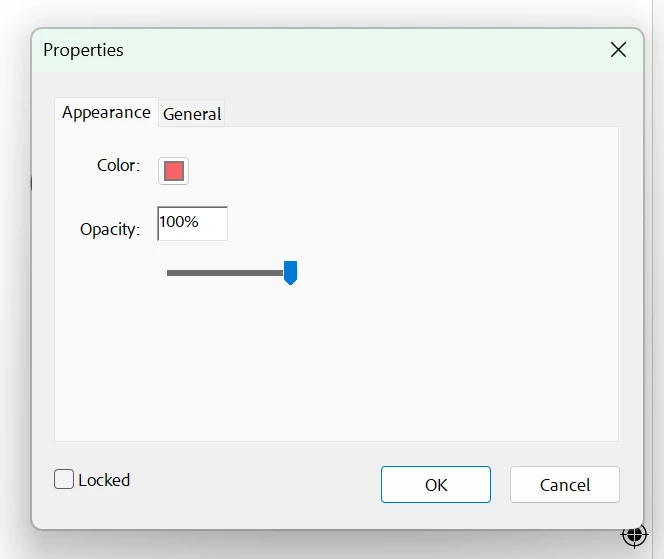
See! No “Make current properties default” at the bottom!


This happens regardless of whether I’m using new-look Reader or reverting to the old version. I’m in Windows 11 and using a 32-bit version because apparently that’s all that works with an ARM processor. 

I remember this happening once before (on my previous laptop), and I don’t remember what fixed it. 

(Perhaps related: I am not signed in, or at least it does not appear that I’m signed in, because when I do try to sign in, the browser sign-in works fine, but then the app freezes up and a I just get a repeated error ping if I click on anything, and I have to force-quit out. Is the option of saving different defaults somehow linked to account sign-in?

Also: I don’t have Creative Cloud installed. I would prefer not to have to install it! But is that related somehow?) 

    6 replies

    Participant
    August 28, 2026

    Hi Amal!

    Thanks for your reply. Very helpful to know about the combined types of comments -- that makes sense! Unfortunately, considering “replace text” is the main commenting tool I use, it’s not really feasible, time-wise, to do two separate comments. So the color will just have to stay as is. (I’d hoped to distinguish the colors for deleting vs replacing text because some people I work with were not understanding the difference.) 

    Name issue: Solved. I just tried changing my name on a Strikethrough comment, and clicking “Make current properties default” -- and now the name change seems to be applied to every type of comment. (Though unfortunately not retroactively.) This all may seem screamingly obvious, but I have read Adobe’s help docs on this a million times and have never come away with the impression that changing the name in a single type of comment would apply the change to all the comment types! I’m glad I finally bothered to try it based on the info you’d given me: I thought if I changed my name on both Strikethrough and Insert comments, maybe they’d automagically change the name on the Replace comments -- turns out it was even simpler!

    Sign-in: I have not been prompted again to sign in, fortunately, but last night I did click “Sign in” on the top bar again just to see if the same thing was happening, and it was. In some other thread, I read that someone found that even though it did not show they were signed in (no account icon in the top bar; still just the words “Sign in”), the app behaved as if they were signed in -- which may be the case for me, but I’m not sure how to test that. (Or if it matters.) What is some action that does require being signed in while using Reader? It used to be that I had to sign in to add a signature -- is that still the case?

    And to answer your questions: freeze happens every time I try to sign in. I get no error text. Only the error bonk/ping when I click anywhere in the app. And I am using the version you mention above (.21789). 

    Thanks again!


    Amal Jaiswal
    Community Manager
    Community Manager
    August 28, 2026

    Hi there 


    We are glad to hear that the Name and the Sign in issue got fixed. For the freeze issue, please share your OS version (Mac or Windows), a small video recording, and the logs as described here https://adobe.ly/4qLySpF for further investigation

    ~Amal

    Participant
    August 28, 2026

    Thanks -- TBH I don’t know if the sign-in issue is fixed. If I were not signed in, would the app be prompting me to sign in every time I opened it? I’m still not sure how to test this idea (that I read in another thread) that I am actually signed in, even though it appears I’m not. (The problem is triggered only when I actively click on the “Sign in” button and go through that process. It sounds as if the app is acting as if one of the sign-in pop-up windows is still open, when it’s not.)

    Participant
    August 28, 2026

    Tiny update: I’ve noticed that the “make current properties default” option is visible in other types of comments: Highlight, strikethrough, polygons. But the one I need to change is “Replace selected text,” to assign a different color from strikethrough (and to change my display name, which seems stuck on my login name, regardless of whether the box in preferences is checked). 


    I notice that for the other kinds of comments, the properties dialog is labeled at the top: “Cross-Out Properties,” for ex, for strikethrough. But on the “replace selected text” properties dialog, it just says (as in my original post) “Properties.” 


    Dialog box for properties on a strikethrough comment: labeled “Cross-Out Properties”


    Amal Jaiswal
    Community Manager
    Community Manager
    August 28, 2026

    Hi Zora,

    Hope you are doing well, and thanks for reaching out. We are sorry for the trouble you are experiencing.

    On the missing "Make Current Properties Default" for Replace Selected Text: that's not something specific to your setup,  it's the product behavior, "Replace Selected Text" actually creates two annotations at once (a strikethrough plus an inserted-text note bundled together).

    If you want your color choice to actually persist, the reliable workaround is to use Strikethrough and Insert Text as two separate comments instead of the combined Replace tool; each of those does support "Make Current Properties Default" on its own.

    On the display name and the sign-in freeze few questions to narrow it down

    • Does the freeze happen every single time you try to sign in, or only sometimes?

    • Do you get any error text at all before it starts pinging, or just silence until you force-quit?

    Given that sign-in itself is freezing the app, please share the version of the application, and try updating it to the latest version  26.001.21789 Out of cycle update, Aug 11, 2026 and reboot the device once and check if that helps. 

    And to answer your question directly: no, you don't need Creative Cloud desktop installed for Acrobat Reader sign-in to work; Reader signs in with your Adobe ID on its own.

    Let us know how it goes. 

    ~Amal