
Participating Frequently
March 11, 2019
Answered

Max Field in Adobe Acrobat Pro Forms.

  • March 11, 2019
  • 1 reply
  • 2894 views

I was trying to mess around with maximum values within the fields of my Adobe Form document.

I learned how to do this through the validation tab in the text field properties, but I was trying to set it so that the maximum value for that field would be based on the value of another field, and potential the checking of a check box.

So for instance Field1 would have a maximum value of field2+2, and if a value higher than that would be entered text would appear that would say "The value cannot be higher than field2+2". Alternatively, if a certain checkbox were selected it would change the maximum value and the text would change to be field2+5, rather than field2+2.

I am unsure if any of this is even possible and if so, I clearly dont know how to make it happen, and any help is appreciated.
This topic has been closed for replies.
Correct answer jane-e

I get what you were suggesting now. I've definitely used that method before, but I don't want it to auto calculate. I want it to allow someone to enter a number, but that that number cant be greater than the other field +2, not just that it would calculate to be the maximum of the two.

Thanks for all of your help. I will simply make this a new question with the javascript section.


HI Rael,

Here's what I have:

  • The numbers are in [FieldZ]

  • A hidden field would yield the highest number in [FieldZ], and in my example is called [Max of FieldZ].

  • Another field would be [[Max of FieldZ] + 2]. That field would add the highest value in FieldZ to 2.

  • My syntax isn't right — just the theory.

Otherwise, JavaScript isn't that hard for calculations, even though I'm better at copy and paste.

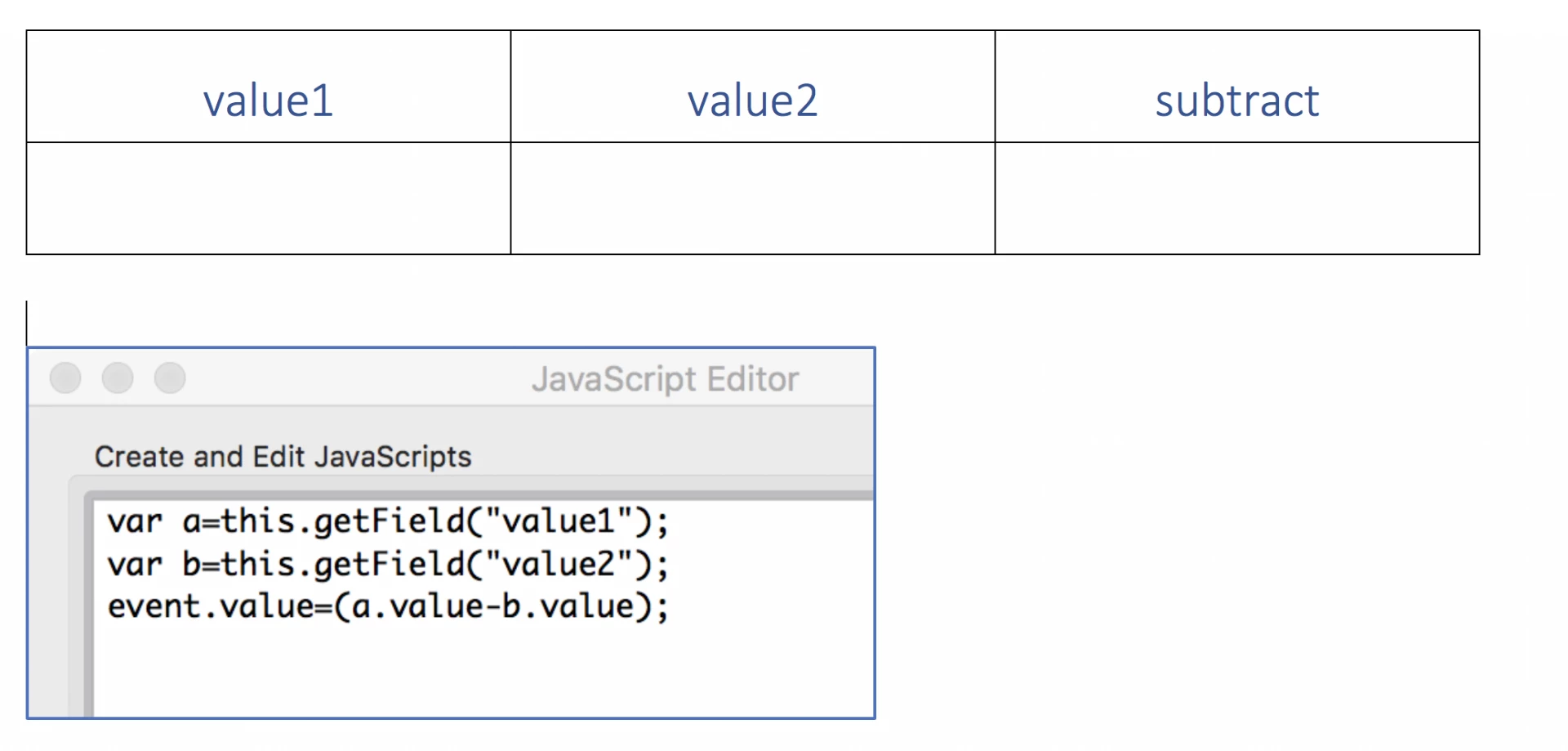
In this example, you can see the two field names in the table. This code would go in the field for subtract in the Custom Calculation Script. First the variables are defined, then comes the math.

1 reply

jane-e
Community Expert
Community Expert
March 11, 2019

Hi Rael,

Try doing a the calculation in a hidden field.

I'll call it FieldA, and FieldA would calculate Field 2+2.

Field 1 would then have a maximum value of the hidden FieldA.

I just kept reading though, and you want the "2" to be a variable. So that's in another field: FieldB and hidden Field A calculates Field2 + FieldB.

Am I following correctly?

Anyway, use hidden field for the intermediate calculations and come back if it doesn't work (and let us know if it does!)

You could also write JavaScript and do it that way.

~ Jane

Participating Frequently
March 11, 2019

Thanks for the response. I would definitely wanna avoid writing Java script unless it is the only way to get the job done.

But how do I make it have that maximum value of fieldA? I don't see anything that allows me to set a maximum value. I tried writing it into "Run custom validation script" but it doesn't seem to work the same as it does for making a field auto-calculate.