


August 7, 2019
Question

MCI-Error While Adding Audio Comments

  • August 7, 2019
  • 2 replies
  • 2770 views

Hi everyone,

when I open the comment tool and try to add a voice comment, I get the following error message:
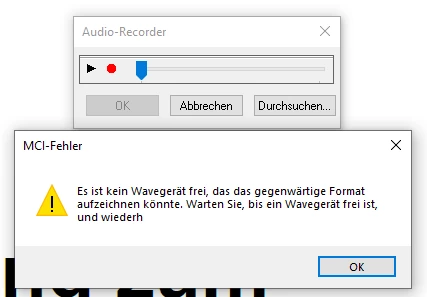
It's in German and pretty much reads "There is currently no wave device available that could record in this format".

I've never seen this before and I have already set the microphone privacy settings within Windows 10 to allow desktop apps.

By the way: This happens on multiple computers.

Does anyone have any ideas on how to resolve this?

Recording sound in other apps works as expected.

Thanks in advance and kind regards,

Mark Hermann

This topic has been closed for replies.

2 replies

Yousif Mahmood
Participant
March 6, 2021

I have this problem too... did you find the solution?


AkanchhaS8194121
Legend
August 8, 2019

Hi Mark,

As per the error message, "There is currently no wave device available that could record in this format". Are you trying to record a voice note to add in comment or trying to browse an audio file?

I have checked the same, this issue is not reproducible at our end. For testing, you may try the following step-

1- Navigate to Reader>Edit>Preferences>Security (Enhanced)>disable "Protected Mode at Startup" and "Enhanced Security">OK>Reboot Reader

Note: Changing the above security settings could pose security risks. We suggest you to turn it back On once you are done with testing.

2- Open Acrobat>Help>Check for update

https://www.adobe.com/devnet-docs/acrobatetk/tools/ReleaseNotesDC/index.html

We would be looking forward for the update from you. Keep us posted.

Thanks,

Akanchha

August 12, 2019

Hi Akanchha,

I was indeed trying to record a voice note.

Turning off the Protected Mode has worked.

However, I would rather not leave it off.

Do you have any other suggestions on how to fix this without negatively impacting security?

Thanks,

Mark

Amal.
Community Manager
Community Manager
August 19, 2019

Hi Netyard-MH,

++ Adding on to the suggestion by Akki_24

You may please refer to the steps provided in the help article - Protected Mode troubleshooting | Adobe Reader

Regards,

Amal