Participant
September 9, 2021
Question

Missing certain letters in documents

  • September 9, 2021
  • 2 replies
  • 4170 views

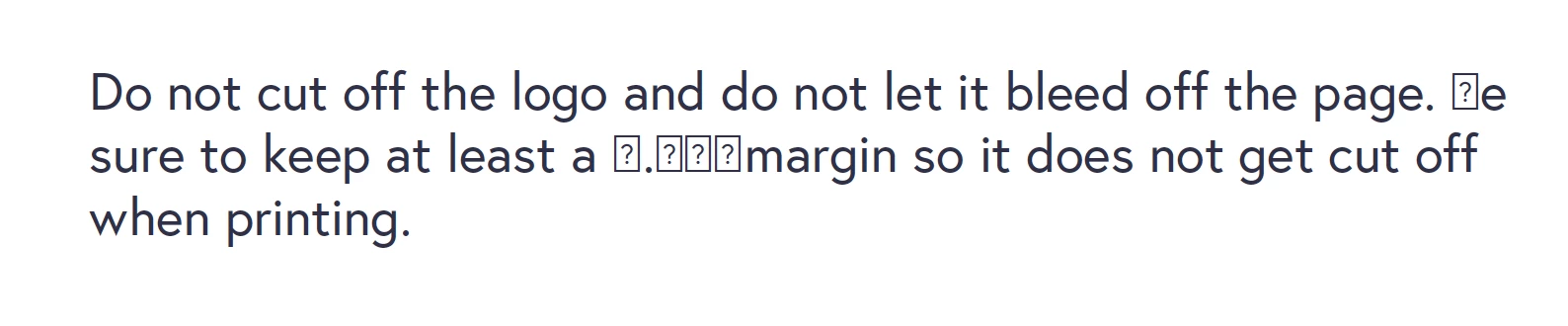
When I was using Acrobat to develop a document, after I hit save, random letters will change from the letter to ?. I am using a font that my copy has purchased the right the use and I have installed the font to my laptop at some point. Could this be the reason?


What will be the best way to resolve this if I have to use this specific font for the document? Here are couple screenshots to help understand the problem. 
 

This topic has been closed for replies.

2 replies

Harsh Vardhan Pareek
Participating Frequently
September 10, 2021

Hi @Jocelyn M. 


Hope you are doing well.

Thanks for posting your issue here. As you have mentioned that some letters are not showing properly in Acrobat. This could be because the fonts in your PDF may not be properly embedded.

Try going to Edit>Preferences>Page Display>Select "Use Local Fonts"> Turn it on if it's off, and off if it's on then restart the application. If that fixes it, try using a Preflight Fixup to embed the font, or it may not print correctly, regardless of how it looks in other viewers. You can confirm the font is embedded by going to File> Properties> Fonts.


Let us know if that helps.


Thanks,

Harsh

Participant
August 2, 2022

Hello, I am experiencing the same issue but this solution did not resolve my problem. Any other suggestions? 

radzmar
Community Expert
Community Expert
August 4, 2022

Those square characters are called tofu and used as some kind of placeholders for characters that aren't available in the used font. If you don't have the same font installed on your computer which was used by the particular PDF there won't be any effect turning on the usage of local fonts. 

try67
Community Expert
Community Expert
September 10, 2021

How exactly did you create the file? And where are you viewing it (under what application and platform)?