
Participant
May 16, 2017
Question

Missing menu bar

  • May 16, 2017
  • 1 reply
  • 3239 views

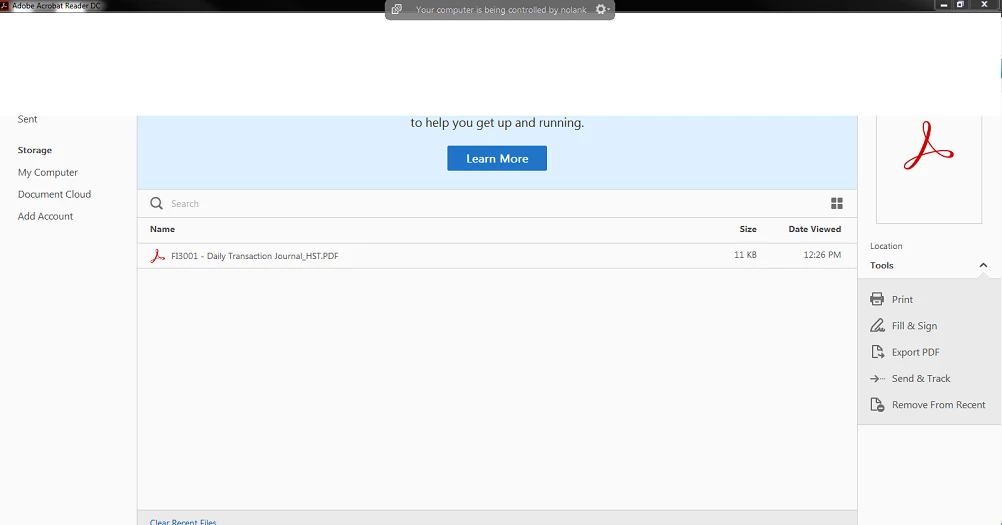
When adobe is open the top 1/3 of adobe is missing and if you click in the space it selects the programs in the background. The minimize and close doesn't work either. You can use the shortcut keys. This was happening in reader 11 and I uninstalled and installed DC. the problem was still there.
    This topic has been closed for replies.

    1 reply

    Meenakshi Negi
    Community Manager
    Community Manager
    May 17, 2017

    Hi nolank12134162,

    Please try to repair the application from the control panel. 

    Open Control panel and select Programmes and Features. Then select Adobe Acrobat reader DC from the list and right click on it.

    Select "Change" from the list and then select the radio button to repair the application.

    If that does not work, try to run the cleaner tool Download Adobe Reader and Acrobat Cleaner Tool - Adobe Labs and restart your system.

    Then try to re-install the application from here: Adobe - Adobe Acrobat Reader DC Distribution

    Let us know how it goes.

    Regards,

    Meenakshi