Known Participant
May 1, 2021
Answered

Missing Zoom in Adobe Acrobat Reader

  • May 1, 2021
  • 3 replies
  • 16958 views

I assume there has been some kind of update to Reader and now the tool at the top that allowed you to pick your zoom level in a drop-down is gone. I can't find the equivalent to the old Zoom in the menus anywhere. I may have to move to some other Win10 compatible PDF viewer, this is just too awkward to use, now. 

 

This topic has been closed for replies.
Correct answer jane-e

Hi

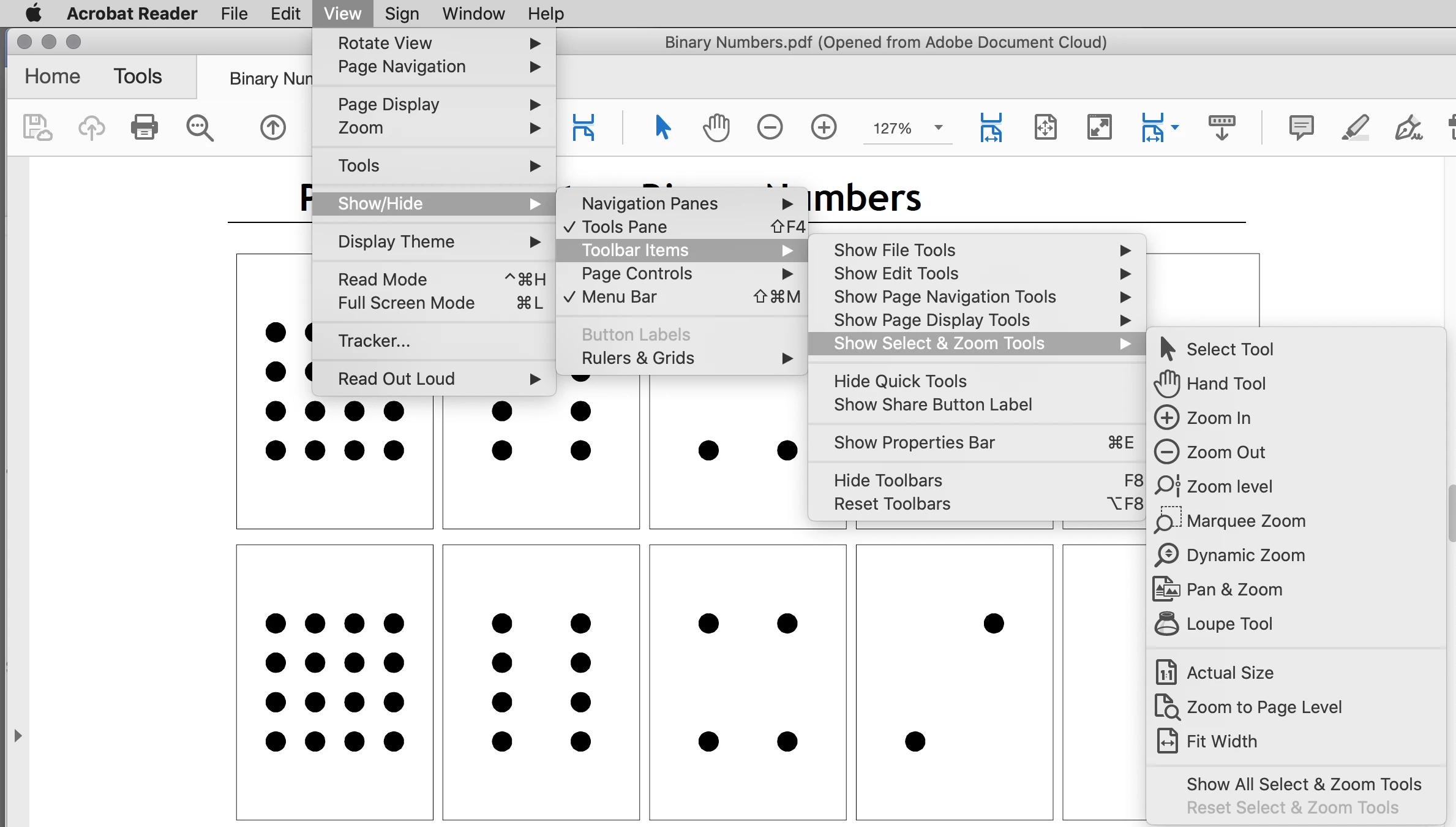
Option + F8 (Alt+F8 on Windows) will reset your tools to their defaults. You can also customize the toolbar:

  • View > Show Hide > Toolbar Items > Show Select and Zoom > enable the ones you want
  • Right-click in the toolbar and choose the group of tools

"Zoom Level" is the one with the drop down.


~ Jane

3 replies

Nancy OShea
Community Expert
Community Expert
May 1, 2021

[Moderator moved from Acrobat to Actobat Reader because they are 2 different products.]


Nancy O'Shea— Product User & Community Expert
jane-e
Community Expert
Community Expert
May 1, 2021
quote

I assume there has been some kind of update to Reader

By @e_canuck


Also, you posted to Acrobat but asked about the Reader. Can you confirm which you are using? My screen shot is from Reader, but the instructions to restore the tools are the same for both.


~ Jane

jane-e
Community Expert
jane-eCommunity ExpertCorrect answer
Community Expert
May 1, 2021

Hi

Option + F8 (Alt+F8 on Windows) will reset your tools to their defaults. You can also customize the toolbar:

  • View > Show Hide > Toolbar Items > Show Select and Zoom > enable the ones you want
  • Right-click in the toolbar and choose the group of tools

"Zoom Level" is the one with the drop down.


~ Jane

e_canuckAuthor
Known Participant
May 2, 2021

Thanks, Jane.
I see now there are Zoom tools there, they are just all changed from what they were before and have unhelpful icons that don't communicate meaningfully for me. If I click on the Pan & Zoom one (I can get to a percentage zoom box though it's not a nice clean drop-down menu like there was before this update. 

It would more helpful if Adobe is going to change an interface that's been a certain way for a long time if they would  provide a wizard or pop-up in the new edition the first time the program is opened and explain the changes. I used to work with the Acrobat editor version on the job I retired from and the Reader only version should make it as easy as possible for people to navigate and view a PDF because that is the primary function (except for the odd form with fillable fields that organizations may distribute.)