
Participant
February 18, 2020
Answered

Modifier le fichier de destination des enregistrements ADOBE READER

  • February 18, 2020
  • 1 reply
  • 7236 views

Recemment lors de l'enregistrement sous d'un fichier pdf, on nous proposait des fichiers recemment utilisés, or maintenant c'est un seul emplacement qui est proposé par défaut, or c'est trés génant quand il faut modifier à chaque fois le dossier , lors de d'opérations répétitives ! Comment puis-je modifier cela


Mercie de vore réponse
This topic has been closed for replies.
Correct answer ls_rbls

Is this the version of the flashplayer that you updated to Version 32.0.0.330?


 I am trying to figure out if you updated by installing it manually if the mcAffee antivirus was also installed with it. However, have yuo checked if your browser was also modified by this flashplayer update?


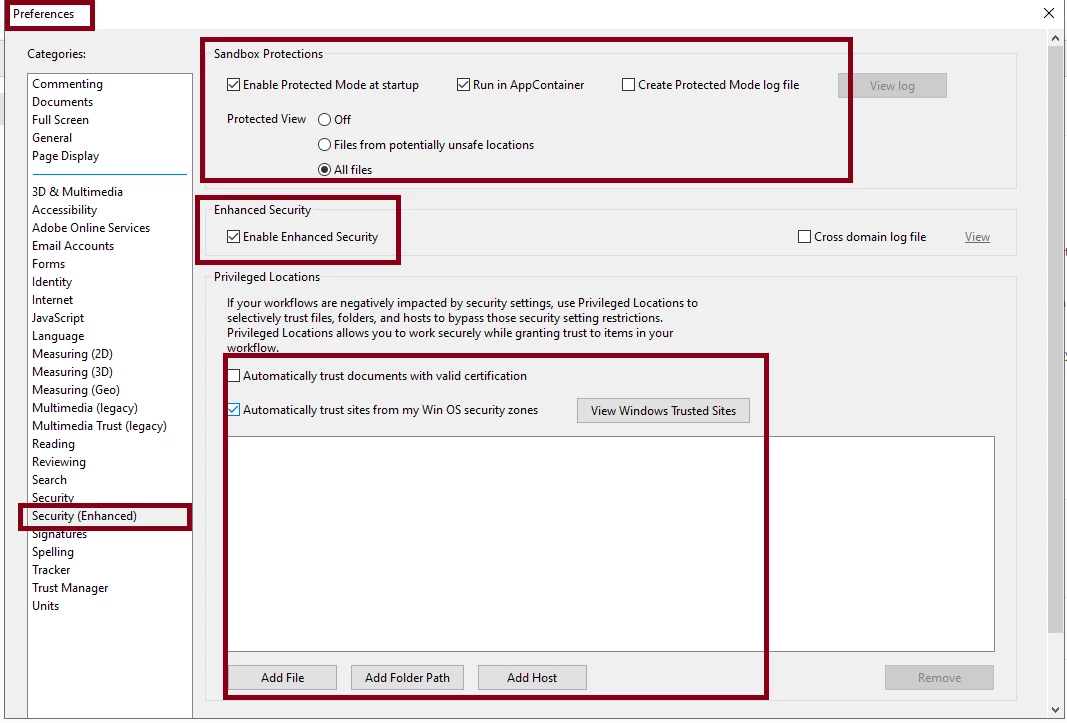
The reason I'm asking is because maybe there is some sandbox protections been enforced based off of the Internet zones of your browser. See if this link helps in any way: https://helpx.adobe.com/acrobat/using/enhanced-security-setting-pdfs.html?mv=product


And see slide below and compare your current settings in your Adobe Reader:


1 reply

ls_rbls
Community Expert
Community Expert
February 18, 2020

Are you sharing PDF files on Windows network?


Have you notied if this started happening after an upadte?

anne19Author
Participant
February 18, 2020

non je ne partage pas de fichiers sur windows. je n'ai pas eu de mise à jour concernant adobe reader, seulement adobe flash payer

ls_rbls
Community Expert
ls_rblsCommunity ExpertCorrect answer
Community Expert
February 18, 2020

Is this the version of the flashplayer that you updated to Version 32.0.0.330?


 I am trying to figure out if you updated by installing it manually if the mcAffee antivirus was also installed with it. However, have yuo checked if your browser was also modified by this flashplayer update?


The reason I'm asking is because maybe there is some sandbox protections been enforced based off of the Internet zones of your browser. See if this link helps in any way: https://helpx.adobe.com/acrobat/using/enhanced-security-setting-pdfs.html?mv=product


And see slide below and compare your current settings in your Adobe Reader: