josuea32789905
Participant
May 10, 2017
Answered

Multiple documents on one window?

  • May 10, 2017
  • 2 replies
  • 25999 views

How can I configure Reader XI to open all documents in the same window instead of as individual windows?

    This topic has been closed for replies.
    Correct answer AkanchhaS8194121

    Hi Josuea32789905,

    EDITED-

    The functionality you are looking for is not available in the older version of Adobe Reader. You need to update it to the newer version which is  Adobe Reader DC

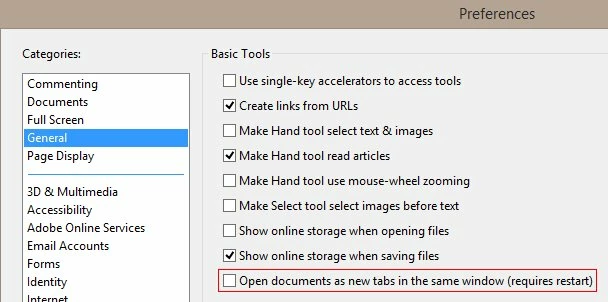
    You may check the preferences settings whether the box highlighted in the below image is selected or not?

    Launch application> Edit >Preferences>General

    As you do want to open the multiple documents in same window, so make sure "Open documents as new tabs in the same window" is selected.

    Hope this will help.

    Regards,

    Akanchha

    2 replies

    Bernd Alheit
    Community Expert
    Community Expert
    May 10, 2017

    Install the latest version of Acrobat Reader DC.

    AkanchhaS8194121
    AkanchhaS8194121Correct answer
    Legend
    May 10, 2017

    Hi Josuea32789905,

    EDITED-

    The functionality you are looking for is not available in the older version of Adobe Reader. You need to update it to the newer version which is  Adobe Reader DC

    You may check the preferences settings whether the box highlighted in the below image is selected or not?

    Launch application> Edit >Preferences>General

    As you do want to open the multiple documents in same window, so make sure "Open documents as new tabs in the same window" is selected.

    Hope this will help.

    Regards,

    Akanchha

    Participant
    August 30, 2021

    This option is not avaliable on the latets 2021 version of DC

    Participant
    July 7, 2022

    This feature needs to come back ASAP! Why was it taken away?