alejandroc27128299
Participating Frequently
May 23, 2017
Answered

NEED HELP!!! My Adobe Acrobat Reader DC does not allow me to save any PDF file

  • May 23, 2017
  • 3 replies
  • 1905 views

Could anyone help with this.... I have the free Adobe Acrobat Reader DC version

    This topic has been closed for replies.
    Correct answer Test Screen Name

    I think  this might be the same as the "white screen" problem. There is an option "Show online storage when saving files". If this option is turned OFF it can help. I show a screen shot of the English version to help locate this preference. (Start with Edit > Preferences or Ctrl+K).
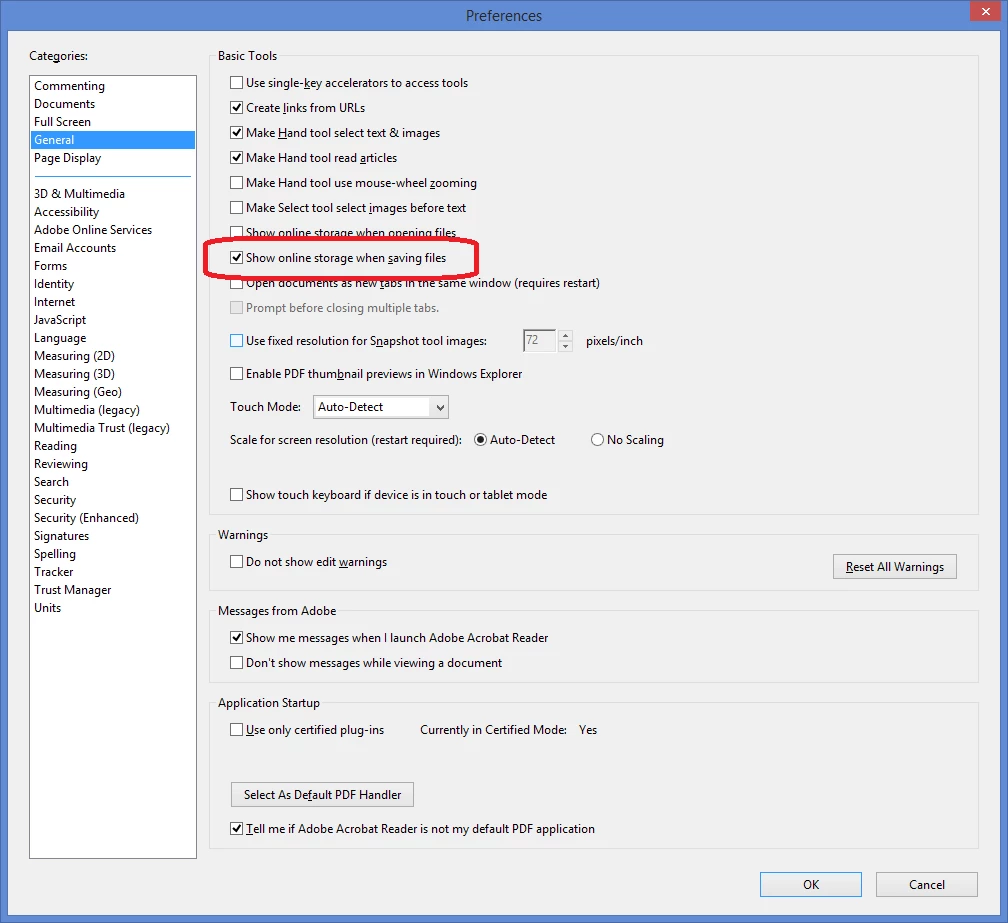
    Turn option OFF.

    3 replies

    Test Screen NameCorrect answer
    Legend
    May 24, 2017

    I think  this might be the same as the "white screen" problem. There is an option "Show online storage when saving files". If this option is turned OFF it can help. I show a screen shot of the English version to help locate this preference. (Start with Edit > Preferences or Ctrl+K).

    Turn option OFF.

    alejandroc27128299
    Participating Frequently
    May 24, 2017

    Thank you very much for your help...it worked

    alejandroc27128299
    Participating Frequently
    May 23, 2017

    When I save a document the screen to save is displayed but black

    try67
    Community Expert
    Community Expert
    May 24, 2017

    What's your OS? What exact version of Reader are you using?

    alejandroc27128299
    Participating Frequently
    May 24, 2017

    I have Windows 10 and the Reader versión is 2017.009.20044

    try67
    Community Expert
    Community Expert
    May 23, 2017

    What do you mean? What happens when you attempt to save a file?