
Inspiring
July 16, 2025
Answered

Need text field to match name of list item

  • July 16, 2025
  • 2 replies
  • 184 views

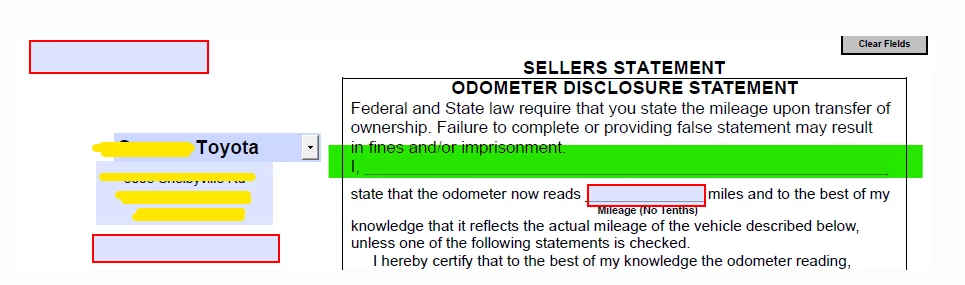
Hi! I need the highlighted green text field to match just the item name that appears when I pick it from the list.


I have:


var Addresses =this.getField("Stores").value;
event.value=Addresses;


in another text field, but I do not want those outputs on that green line. Just the list's item name. Don't know if this will affect anything 🙂


Correct answer try67

I assume you have Acrobat (even though you posted in the Reader forum) or you wouldn't be able to do what you described.

The code you posted should work, if you place it as the custom calculation script of the text field.

However, you will need to set the drop-down field to commit the selected value immediately (under Properties - Options), or the value will only show in the text field once you exit that field, not when you select it.

2 replies

try67
Community Expert
try67Community ExpertCorrect answer
Community Expert
July 20, 2025

I assume you have Acrobat (even though you posted in the Reader forum) or you wouldn't be able to do what you described.

The code you posted should work, if you place it as the custom calculation script of the text field.

However, you will need to set the drop-down field to commit the selected value immediately (under Properties - Options), or the value will only show in the text field once you exit that field, not when you select it.

creative explorer
Community Expert
Community Expert
July 20, 2025

@symone_1736  Unfortunately, you cannot use the free Adobe Acrobat Reader DC to implement the JavaScript code needed to make the green text field display only the item name from your list. The free Adobe Acrobat Reader DC does not have the capability to create, edit, or embed JavaScript into a PDF document. It can only run existing JavaScript that was put there by a program like Adobe Acrobat Pro. To modify how a form field behaves (like setting its value based on another field's selection), you need to be in "form editing mode," which is a feature exclusive to Adobe Acrobat Pro (or similar professional PDF editing software). Reader is for filling out, not designing or programming, forms. To achieve what you want (populating the green field with the selected list item's name), you must use your licensed Adobe Acrobat Pro software. You will need to open the PDF in Acrobat Pro, access the properties of your "Stores" list field, and then add the JavaScript code to its "Actions" tab.

m