Hi Ragatio,
If you are referring to print PDF in A3 format, it can be done from the printer properties.
Open the PDF and click on Print icon.
Then select the printer name from the drop-down list.
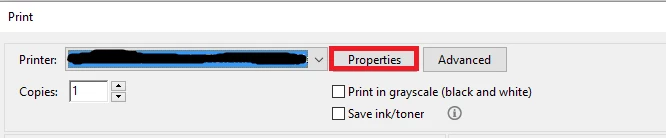
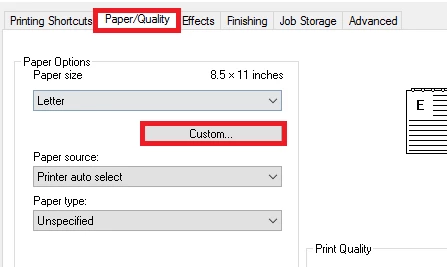
Now go to Properties tab > Paper quality and click on "Custom" tab.
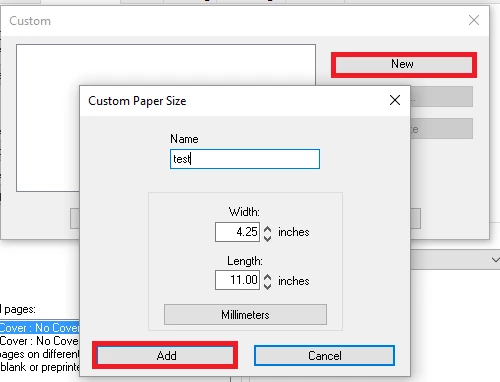
Then click on new and enter any name for the size and the measurement below.
Once done, click on "Add" at the bottom.
Now you can select that size to Print the PDF as you required.
You may also refer the step provided in this help document Print PDFs in Acrobat Reader for more information.
To print two PDF pages on a single A4 sheet, go to Properties tab in Print window.
Select A4 from the drop-down of "Paper size" under "Printing Shortcuts" tab.
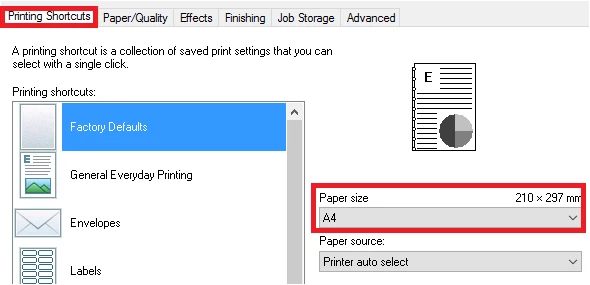
Then click OK at bottom.
Now click on "Multiple" tab and then select the number from the drop-down of Pages per sheet.
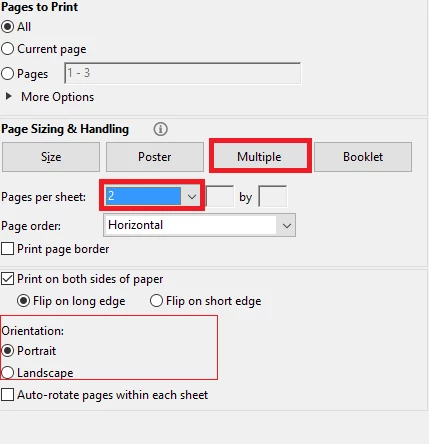
Once done, you can check the preview window at right and print the PDF.
Check if this helps.
Let us know if you are referring to something else or if you need any help.
Regards,
Meenakshi



 AdChoices