Participant
May 6, 2015
Answered

Night Mode Adobe PC Version

  • May 6, 2015
  • 9 replies
  • 277148 views

Hello I am currently running Adobe Reader 9 on a Windows 7 machine. Does Adobe Reader on PC have night mode like mobile Adobe? If so, how can I access it?

Correct answer AadeshSingh

Hi Roy,

There is no such Night Mode feature in Adobe Reader for Windows however, as a work around you can try this :-
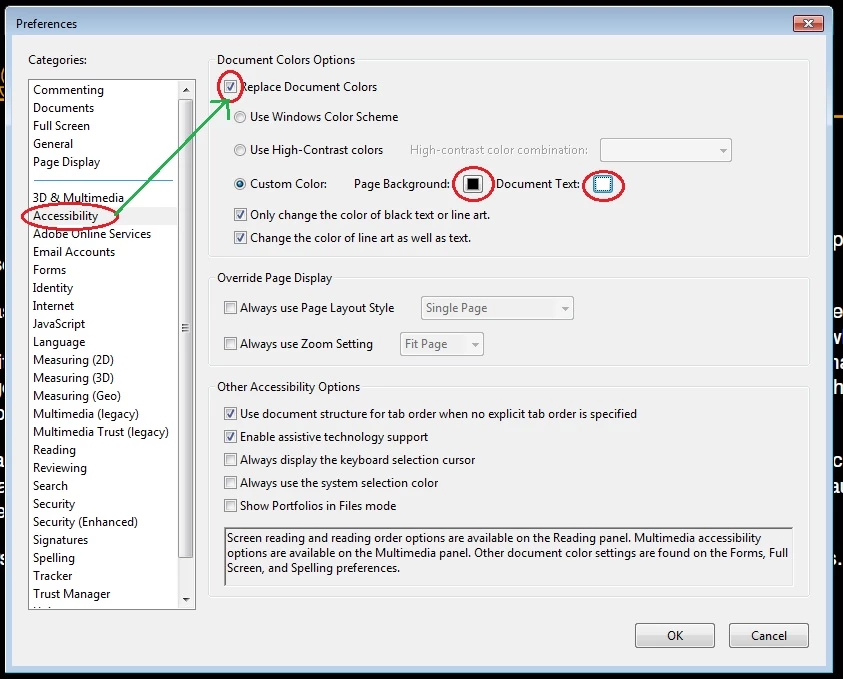
  1. Please Open Adobe Reader, go to Edit menu & select Preferences from the drop-down.
  2. Preferences window will pop up on the screen.
  3. Choose Accessibility from the Categories section.
  4. Now check the Replace Document Color box.
  5. In front of Custom Color Please change the Page Background to Black & Text Document to White.
  6. Click OK to confirm the changes. This will give you the similar result as that of Night mode in Mobile Adobe.

Regards,

Aadesh

9 replies

Participant
January 1, 2025

ExpounderX
Inspiring
January 1, 2025

The actual PDF is still white in color. Adobe should work on tech to darken that too.

Participant
September 20, 2024
Participant
November 12, 2023

It's too bad that after 8years!!! still there is no option to enable night mode directly with one click.

this is a very common and useful feature in lots of pdf readers except Adobe Acrobat!!!

ExpounderX
Inspiring
January 1, 2025

Which other PDF readers allow PDF to darken?

ExpounderX
Inspiring
October 5, 2023

There should be a proper full fledged darm mode that needs to be introduced by Adobe on all platforms - Windows, iOS, iPad, Android, Mac and everything. 

Participant
August 8, 2020

Great thanks.

Participant
July 26, 2020

Thanks for the help.

Participant
July 9, 2020

Hello Aadesh,

I attempted this workaround but I still have several documents that still show up with a white background and black text. Is there a way to change all documents or are there just some that cannot be changed?

Bernd Alheit
Community Expert
Community Expert
July 26, 2020

It will not work for scanned documents.

Participant
December 15, 2023

But it does work on scanned documents, on tablet.

Participant
July 1, 2020

Thank you so so much! I have terrible light sensitity due to medical conditions and I need to use PDFs frequently. Previously, they would cause me a lot of pain because they were so bright. This technique you have provided has given me so much relief. Thank you! Thank you! Thank you!

AadeshSingh
Community Manager
AadeshSinghCommunity ManagerCorrect answer
Community Manager
May 6, 2015

Hi Roy,

There is no such Night Mode feature in Adobe Reader for Windows however, as a work around you can try this :-

  1. Please Open Adobe Reader, go to Edit menu & select Preferences from the drop-down.
  2. Preferences window will pop up on the screen.
  3. Choose Accessibility from the Categories section.
  4. Now check the Replace Document Color box.
  5. In front of Custom Color Please change the Page Background to Black & Text Document to White.
  6. Click OK to confirm the changes. This will give you the similar result as that of Night mode in Mobile Adobe.

Regards,

Aadesh

Participant
May 12, 2020

Hi,

Text inversion way of night mode is good but is there any way to invert colors of image in a pdf using Adobe Acrobat reader?