
Participant
May 22, 2026
Question

No option to prevent Adobe for auto-opening downloaded files

  • May 22, 2026
  • 1 reply
  • 7 views

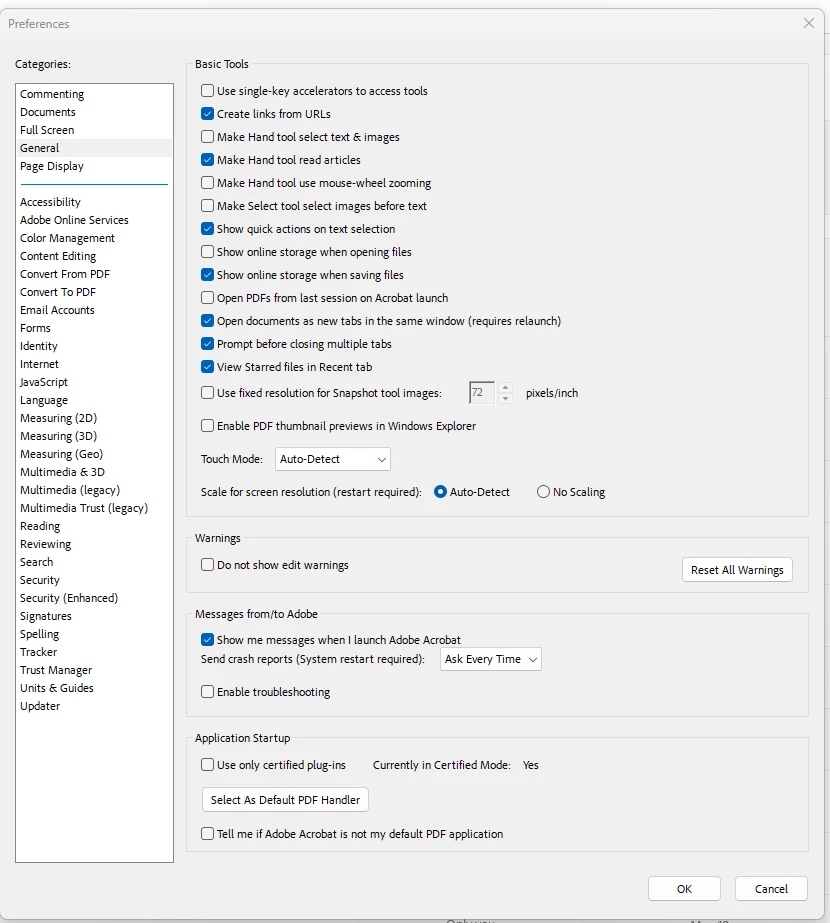
I want to prevent Adobe from automatically opening PDF files I download from Microsoft Edge.  The suggested solution is to use CTRL+K to open Preferences and then uncheck the box titled  “Always open PDFs downloaded from the web”.  However, the screenshot below shows that this option does not exist for me at all.  Please help.
 

    1 reply

    Community Manager
    May 22, 2026

    Hi ​@ned_5513 ,

    Thanks for reaching out, and sorry for the troubled experience.

    Please ensure your copy of Acrobat is up to date. To check for pending updates, launch Acrobat, then select Help > Check For Updates.
    And then check for preference again. If you are still unable to find the preferences, help us with the following:

    • Acrobat version.

    • Operating system name and version.

    • New screenshot of the preferences.


    Will be waiting for your response.


    ~Tariq

    ned_5513Author
    Participant
    May 22, 2026

    Hello Tariq - it looks like I have the lastest version of Adobe.  

    My operating system is a Windows 11 Pro (version 25H2)