
January 6, 2026
Answered

O botão "assinar" da ferramenta "usar certificado digital" não funciona

  • January 6, 2026
  • 2 replies
  • 246 views

Prezado(a), bom dia!
Não consigo mais usar a ferramenta "usar certificado digital"

(),

pois quando chego na tela (abaixo), ao clicar no botão "assinar", ela ou não responde ou parece carregar por um segundo porém volta a essa mesma tela, não importando quantas vezes eu clique.
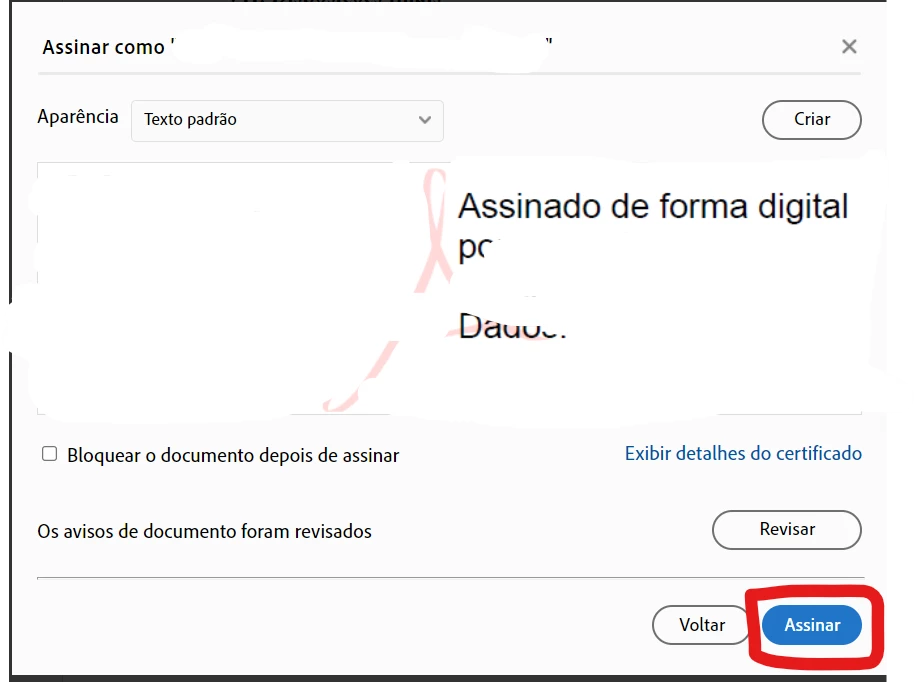
Essa opção funcionava corretamente há alguns anos, mas agora não funciona para nenhum PDF. 
A minha versão do adobe é: 2025.001.20997 | 64 bits.

Minha versão do Windows é:
Edição Windows 10 Home Single Language
Versão 21H2
Instalado em ‎07/‎08/‎2020
Compilação do SO 19044.1526
Experiência Windows Feature Experience Pack 120.2212.4170.0

Já desinstalei e reinstalei o Adobe reader, atualizei e corrigi a instalação, mesmo assim continuo não conseguindo concluir a assinatura com certificado digital. O que devo fazer para corrigir esse erro?

Grata pela atenção.
Correct answer Meenakshi_Negi

Obrigada pelo retorno Sra. Meenakshi!
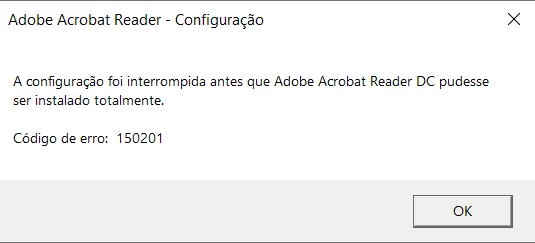
Rodei o "cleaner tool", sem mensagem de erros, reiniciei o computador e tentei fazer o download do Acrobat Reader pelo link que a Sra disponibilizou na mensagem. No entanto, recebi a seguinte mensagem de erro:

Como devo proceder?

Obrigada desde já.


Hi bela_2431 ,


The error often occurs when the installer fails to extract the setup files from the installer.bin package during the installation process. This can happen due to:

  • Corrupted or incomplete downloads
  • Conflicts with antivirus or endpoint protection software
  • Issues with temporary folders or permissions
  • Leftover files from previous installations.

Please re-run the Acrobat Cleaner tool to remove the installed or leftover installation files. Ensure that all the files related to Adobe Acrobat Reader are removed. Reboot the computer.

Also, ensure that all mandatory and optional operating system updates are installed. And then try reinstalling Acrobat Reader. Run the setup file as an administrator. Right-click on the setup file and choose 'Run as administrator'.


You may temporarily Disable Antivirus. Check Temp Folder Permissions. Ensure the user has full access to:
C:\Users\<username>\AppData\Local\Temp\
C:\ProgramData\Adobe\Temp\


Workaround: Extract the installer files from the zip folder. Run the setup.exe manually from the extracted files.


Let us know how it goes.


Thanks,

Meenakshi

2 replies

January 12, 2026

Também estou com o mesmo problema.

Não consigo fazer assinatura digital, e na opção Todas ferramentas sumiu a grande maioria das coisas que ficam ali:


Meenakshi_Negi
Legend
January 13, 2026

Hi jpereirasilva,


Thank you for reaching out.


According to the screenshot, we can see that the document you have opened is a signed document. On a signed document, no changes can be made, and so, the tools do not appear according to the document settings. 

Please try opening any other PDF without any signature and see if you can find the tools under the All Tools tab.


Let us know if you have any questions.


Thanks,

Meenakshi

creative explorer
Community Expert
Community Expert
January 7, 2026

@bela_2431 what's the error message that it gives?

m
Meenakshi_Negi
Legend
January 7, 2026

Hi bela_2431,


Thank you for reaching out, and sorry for the trouble caused.


Please try creating a new digital signature and then check if you can add it to the document. Did you check if the issue occurs with any PDF you try to add a signature to?


We know you have already tried reinstallation. Please try once using the steps suggested below:

- Remove the application and run the cleaner tool (https://adobe.ly/4bnLKMP).
- Reboot the machine
- Install Adobe Acrobat Reader from the following page: https://adobe.ly/49onTKj.


Let us know how it goes.


Thanks,

Meenakshi

bela_2431Author
January 14, 2026

Obrigada pelo retorno Sra. Meenakshi!
Rodei o "cleaner tool", sem mensagem de erros, reiniciei o computador e tentei fazer o download do Acrobat Reader pelo link que a Sra disponibilizou na mensagem. No entanto, recebi a seguinte mensagem de erro:

Como devo proceder?

Obrigada desde já.