
Participant
May 16, 2024 4:19 PM UTC
Answered

Ocultar la barra de herramientas

Buenas tardes, queria saber si hay alguna función para que la borra flotante que presenta la "herramienta de selección, agregar notas, firmar, etc." puede ocultarse o colocarla fija en otra zona, ya que al estar flotante me interfiere en la lectura. Gracias.
 

This topic is closed to new replies. Start a new post to keep the conversation going.
Abambo
AbamboCorrect answer
Community Expert
May 18, 2024 8:32 PM UTC

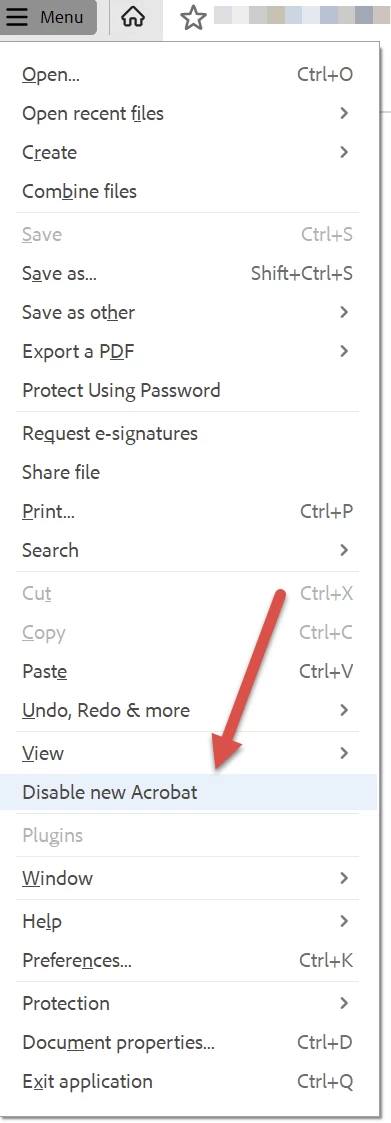
Switch back to the old interface.


ABAMBO | Hard- and Software Engineer | Photographer

7 replies

Participant
May 18, 2024 6:49 PM UTC

Buenas, tenía la misma duda, y la única opción que encontré fue activar el "modo lectura" (Menú > Ver > Modo lectura). Espero sea de ayuda. Saludos

Translate
Participant
May 19, 2024 1:54 PM UTC

Me pasaron este link por si te sirve https://community.adobe.com/t5/acrobat-discussions/acrobat-2023-how-to-revert-to-classic-gui-user-interface/m-p/14052807#M426838 
De esa manera vuelves a la interfaz del antiguo adobe. Espero te sirva.

Translate
Abambo
Community Expert
Community Expert
May 16, 2024 7:02 PM UTC

You can move that bar around. So I do not understand the question?

Translate
ABAMBO | Hard- and Software Engineer | Photographer
Participant
May 16, 2024 7:17 PM UTC


si, puedo moverla, pero al leer con la pantalla dividida tapa mi texto. Estaba acostumbrada a tenerlo como en la segunda imagén, ¿hay alguna manera de colocarla así ahora?


Translate
Abambo
Community Expert
AbamboCommunity ExpertCorrect answer
Community Expert
May 18, 2024 8:32 PM UTC

Switch back to the old interface.


Translate
ABAMBO | Hard- and Software Engineer | Photographer