Participant
May 10, 2021
Answered

Open all files in single page view?

  • May 10, 2021
  • 2 replies
  • 6574 views

Adobe Acrobat Reader 21.001.20150

I have set preferences so default view is single page.
However, when I open some pdf documents, they open in side-by-side 2-page view. This may be hard-coded into the document, overwriting the default in reader.

For us with poor vision, is there a way to configure reader so that it always opens documents in single-page view? 

Thank you for your help.

This topic has been closed for replies.
Correct answer try67

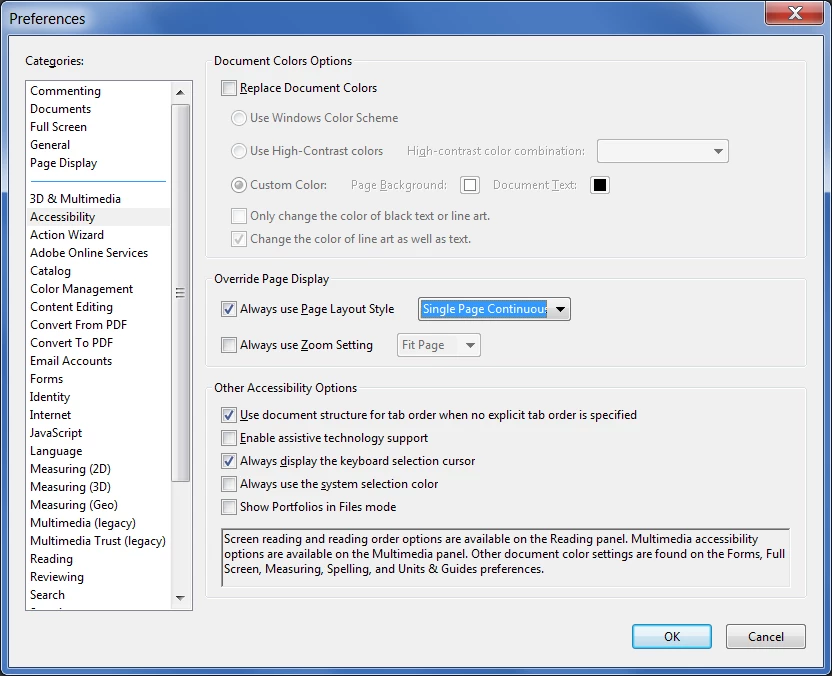
Go to Preferences - Accessibility and set it there:


That will override all preferences saved in the file, unless the view setting in it is set using a script.

2 replies

try67
Community Expert
try67Community ExpertCorrect answer
Community Expert
May 11, 2021

Go to Preferences - Accessibility and set it there:


That will override all preferences saved in the file, unless the view setting in it is set using a script.

Bob5EEDAuthor
Participant
May 11, 2021

try67,

Thank you. That works.

Participant
January 20, 2022

Thank you!!!  This helped me accomplish the same thing.  Very helpful!

Amal.
Legend
May 11, 2021

Hi Bob


Hope you are doing well and sorry for the trouble. As described, the PDF documents open in side-by-side 2-page view.


Is this a behavior with a particular PDF file or with all the PDFs you open? The initial view of the PDF document is set by the creator/author of the PDF file.


You may try the following preference settings and see if that works for you:

Go to Edit (Win), Adobe Acrobat (Mac) > Preferences > Page Display > Under 'DEfault layout and Zoon' Select Page Layout as 'Single page Continuous' and see if that works for you.


Regards

Amal

Bob5EEDAuthor
Participant
May 11, 2021

Amal,

Thank you for the suggestion. I tried "single page continuous" and it doesn't help. Perhaps there is no way to force single-page view.