Open, Save or Cancel prompt problem
Hi,
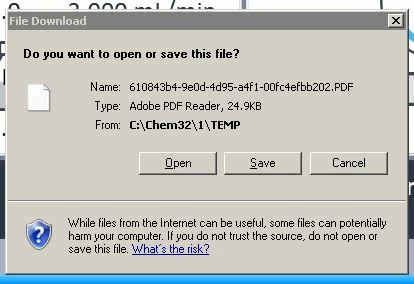
This problem is driving me up the wall, please can someone help, We have 4 computers and on 2 of the computers this prompt opens when a report is generated and I just want the report to show on the screen and not come up with this prompt.
We are using Adobe reader Version 11.010 and Windows 7 Pro
1)So far I have checked settings in adobe reader on the PC's where this happens are the same as the preferences in the 2 PC's this does happen.
2) I uninstalled adobe reader and re installed from the adobe website
3)I have made sure that the box in Internet > Preferences Display in read mode by default, Allow fast web service and Allow speculative downloading in the background are all ticked.
4) I checked that the adobe reader plug in is present and enabled in internet explorer
5) I have ticked the do not show edit warnings box in General in preferences
6) In preferences > Security Enhanced I have unticked the Enable enhanced security.
7) In internet explorer I unticked the Enable protected mode in Tools>Security
Please can someone tell me how to get rid of this annoying File download box that appears as at work it is important that the report appears on the screen and people aren't having to keep clicking open every time a report is generated.
Thanks
 AdChoices