


Participant
June 19, 2020
Question

Opening Email Attachments from Adobe Reader

  • June 19, 2020
  • 4 replies
  • 5736 views

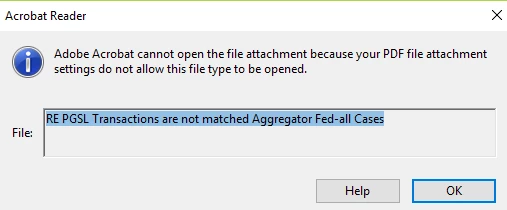
Hi all, I have received pdfs from a client with attachments in them. I have been able to open all excel, word, or pdf attachments, but NOT Outlook or email attachments. Does anyone know how to fix this problem? When going to the help page from the message that pops up it has not been able to to help me resolve the issue. Thank you!
 

This topic is closed to new replies. Start a new post to keep the conversation going.

4 replies

radzmar
Community Expert
Community Expert
June 26, 2020

Acrobat products blocking most files for security reasons. You'll have to put them on a whitelist first, to enable Acrobat/Reader to open them.


https://helpx.adobe.com/acrobat/using/attachments-security-risks-reader-acrobat.html

https://www.adobe.com/devnet-docs/acrobatetk/tools/AppSec/attachments.html#

Amal.
Legend
June 19, 2020

Hi kobi_lawson


We are sorry for the trouble. Is this abehavior with a particular PDF file or with all the PDFs taht you trt to open? Please trt to open a different PDF file and check.


For more information please refer to the help page Error "Adobe Acrobat DC cannot open the file attachment settings because your PDF file attachment settings do not allow this file type to be opened" after August release. and see if that works for you. 


Regards

Amal

Participant
June 20, 2020

Hi Amal,

Thanks for the response, unfortunately it is with all the PDFs I open. Further, the site you referred me to does not seem to state how to fix this issue, just that certain programs have been excluded from the capabilities to open? Please advise as much as you can, I'd appreciate it!

Kobi

Amal.
Legend
June 25, 2020

Hi there


We are sorry for the delay in response. As described this is the issue with all the PDF files. we need some more information for a better understanding:


What is the version of the Adobe Acrobat Reader you are using? To check the version go to Help > About Adobe Acrobat DC


Make sure you have the latest version20.009.20067 installed. Go to Help > Check for Updates.


Also, please try to repair the istallation (For Windows Only) Go to Help > Repair Installation and see if that makes any difference.


Would you mind sharing the workflow/steps you are doing to open the PDF attachments? Please try to download the PDFs to your computer and then try to open them with Adobe Acrobat Reader DC


If it still does/t work, please create a new test user profile with full admin rights in Windows or enable the root account in Mac and try using the application there and check.


Regards

Amal