
Participant
November 22, 2018
Question

Opening PDF from apps

  • November 22, 2018
  • 2 replies
  • 425 views

I can't open the User manual from apps containing the link in their menu. Reader DC is my predefined app for opening PDF files in Windows 10.

No problem when I select e.g. Edge as predefined app.

Example:
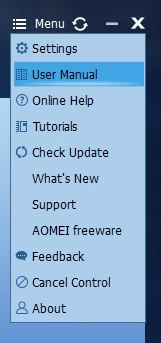
Reader DC is present as a process in background, and I need to manually terminate it.

    This topic has been closed for replies.

    2 replies

    AnandSri
    Community Manager
    Community Manager
    November 28, 2018

    Hello Jerdo,

    We're sorry for the trouble you had, what is the error message you are getting while opening the PDF files? Make sure that you have the latest version of Adobe Reader installed, check for any pending updates of Adobe Reader from help menu>check for updates. Reboot the machine after updating Adobe Reader.

    Make sure that the PDF file that is user manual is downloaded locally and then try to open it with Adobe Reader desktop application.

    If the issue persists, use Acrobat cleaner tool to remove Adobe Reader Download Adobe Reader and Acrobat Cleaner Tool - Adobe Labs

    Reboot the machine and install Adobe Reader from ftp://ftp.adobe.com/pub/adobe/reader/win/AcrobatDC/1900820081/

    Reboot the machine after installing Adobe Reader and check.

    What happens when you open any other PDF file with Adobe Reader? Is it specific to one PDF?

    Let us know how it goes and share your observation.

    Thanks,

    Anand Sri.

    Jerdo1001Author
    Participant
    November 25, 2018

    How I can set the reader for opening these pdf files?