Participant
Feb 14, 2022 8:50 AM UTC
Answered

Où trouver la fonction "Prendre un instantané" (capture de l'écran) ?

Où trouver la fonction "Prendre un instantané" (capture de l'écran) ?

Amal.
Amal.Correct answer
Legend
Mar 20, 2024 7:28 PM UTC

Hi there


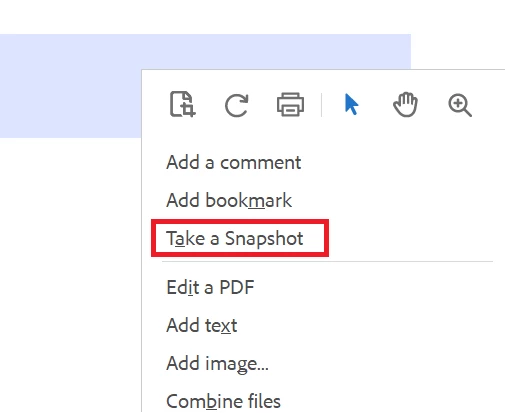
The option lies in the right-click context menu, when you open the PDF in Adobe Acrobat.


Regards

Amal

14 replies

Participant
Jan 30, 2024 5:30 PM UTC

Même problème depuis la dernière version ! Où est "Prendre un instantané" ?


Translate
Participant
Mar 18, 2024 8:14 PM UTC

Même problème ! 
avez vous trouvez la solution.  ?

merci par avance ! 

Translate
Amal.
Amal.Correct answer
Legend
Mar 20, 2024 7:28 PM UTC

Hi there


The option lies in the right-click context menu, when you open the PDF in Adobe Acrobat.


Regards

Amal

Translate
Amal.
Legend
Feb 19, 2022 4:30 AM UTC

Hi Philippe


Hope you are doing well and sorry to keep you waiting.


Please go to Edit  > More > Take a Screenshot and see if that helps.


Regards

Amal

Translate
B i r n o u
Legend
Feb 19, 2022 12:11 PM UTC

is this fonction only in Acrobat but not in reader... ?

I think that in Reader, it is like Lena mentioned, on first level...

I also add some trouble after update, that this menu disappear... I think that it was during the p^hase where Adobe merge Reader, adn Acrobat in the same installer

Translate
try67
Community Expert
Community Expert
Feb 20, 2022 10:49 AM UTC

It's in both applications, but it was moved by Adobe recently to the More sub-menu.

Translate
Community Expert
Feb 14, 2022 11:02 AM UTC

Elle se trouve dans le menu Edition. Si vous ne la trouvez pas là, il se peut que votre version de Reader soit corrompue.

Si tel est le cas, je crains qu'il ne vous faille soit :


Translate