
January 8, 2020
Answered

PDF always open at 100% anywhere

  • January 8, 2020
  • 10 replies
  • 1634 views

Hi everyone,


Does there is a way so a PDF file always open at 100% despite the preferences of the person who opens it?


Asking the concerned people to change their settings is not an option unfortunately.


Thanks,


Charles Fortier
This topic is closed to new replies. Start a new post to keep the conversation going.
Correct answer Test Screen Name

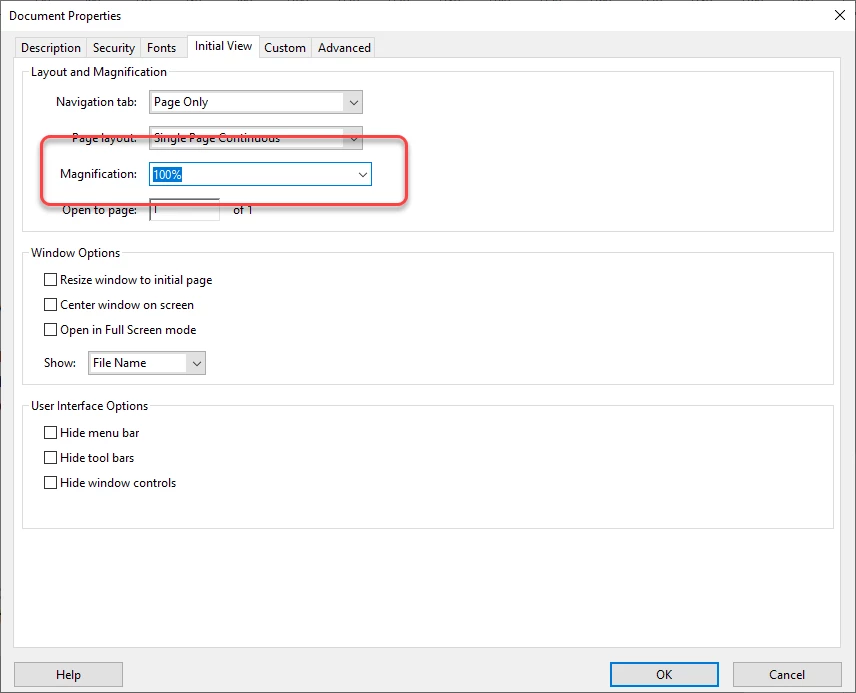
Nothing that anyone changes in Preferences will affect their files for anyone else. They are personal settings. This is File > Properties in Acrobat.

10 replies

January 8, 2020

Note : Only possible with the Pro version.

try67
Community Expert
Community Expert
January 8, 2020

Not even then... I believe the Accessibility settings override even the Open Options settings of the file, which can be set in Acrobat. The only thing that might trump the Accessibility settings is embedding a script into the file to ensure it opens at a specific zoom level.

Test Screen NameCorrect answer
Legend
January 8, 2020

Nothing that anyone changes in Preferences will affect their files for anyone else. They are personal settings. This is File > Properties in Acrobat.

January 8, 2020

We came to the same conclusion.

Thank you again.

Legend
January 8, 2020

Did you try setting Open Options in Acrobat's File Properties? Some apps will ignore it, but Acrobat Reader should not. Indeed, people often complain that they do not like their Reader doing this, so take care with your choices.

January 8, 2020

Thank you for your fast reply.

Unfortunately, my organization only use a 2015 version of Acrobat Reader and it do not have this feature. We know that it is a feature possible in the latest ver

My supervisor will talk to our boss about it.

Thank you again.