


michaelr73758304
New Participant
October 24, 2023
Answered

PDF downloaded from Chrome automatically opening in Acrobat Reader

  • October 24, 2023
  • 26 replies
  • 280701 views

We had a user report an issue to our helpdesk yesterday, she was downloading a PDF document via Chrome, and the document was opening up in Adobe Reader automatically.


We checked the settings in Chrome and it was not set to automatically open Adobe Reader after downloading the PDF, and the Adobe Reader extension was not installed, so we weren't sure why this was happening.


On further investigation we found a setting in the Preferences - General tab called "Open PDFs automatically in Reader when they are downloaded in Chrome browser". Initially when we tried to turn this setting off it would re-enable itself when we closed and reopened Adobe Reader, however clearing the user's preferences from the registry and trying again worked for us. The setting is under HKEY_CURRENT_USER\Software\Adobe\Adobe Acrobat\DC\AutoDocOpen - bIsAutoDocOpenFeatureEnabled dWord 1.


The user is on the current DC build 2003.006.20360.


Has anybody else experienced this, and is there any further documentation available about this feature?


Correct answer KumarVishal

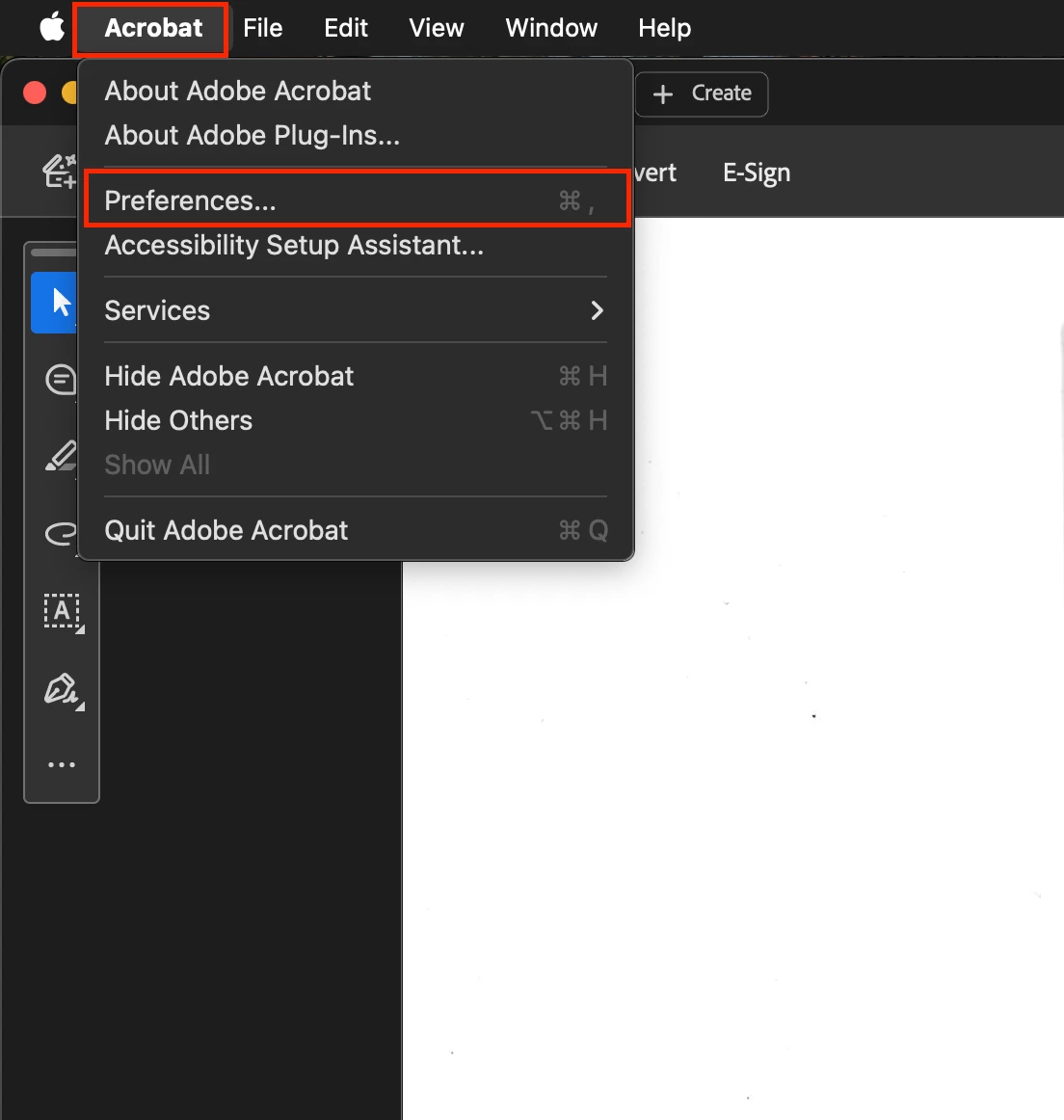
Open installed Adobe's PDF software on your PC. (I'm sharing steps w.r.t MacBook)

  1.  Click on "Acrobat" on top left corner.
  2.  Click on "Prefrences".
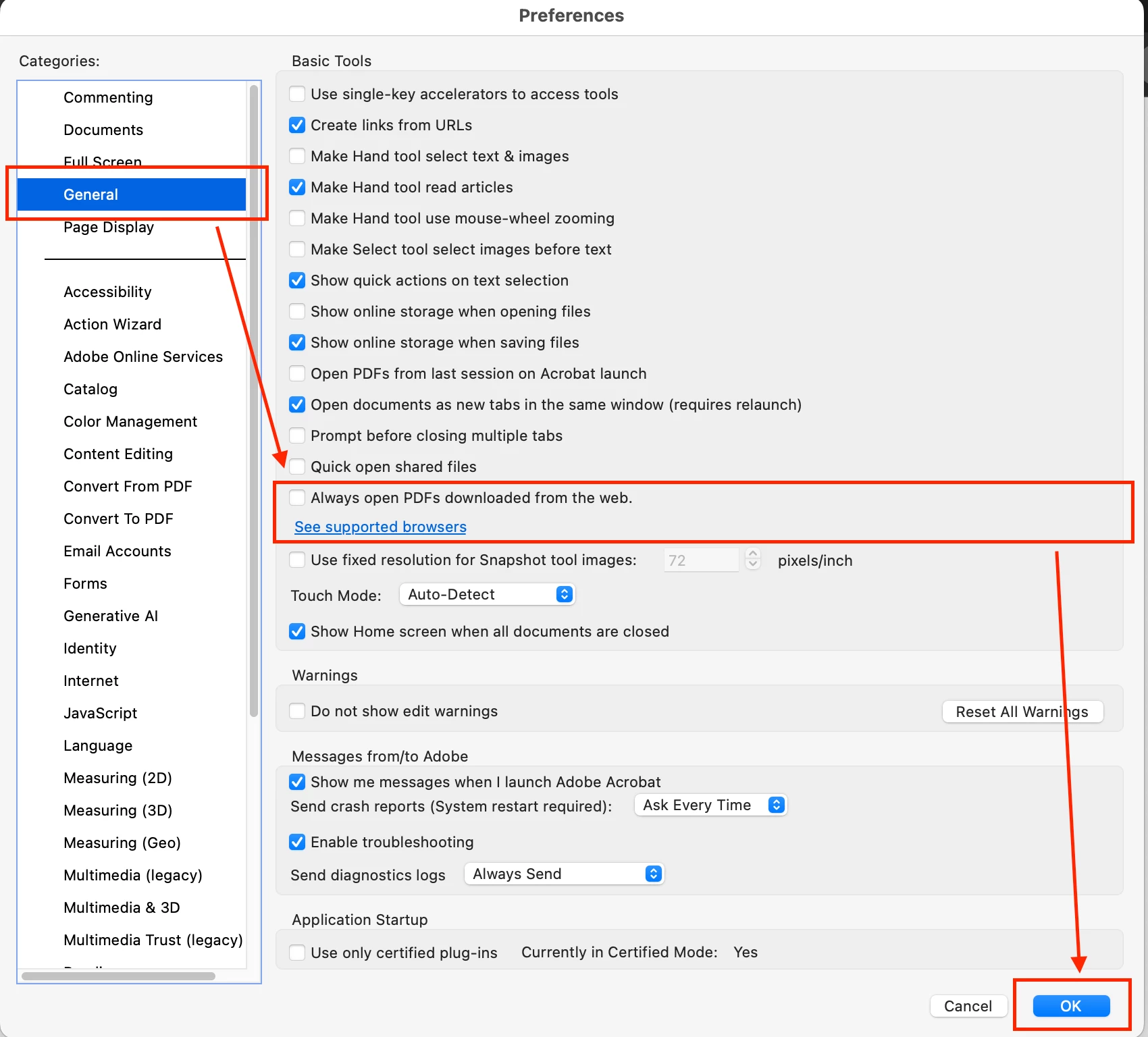
  3. De-select the check box next to "Always open PDFs downloaded from the web".

    Restart you software. see images for ref:


Step 1:


Step 2:


26 replies

KumarVishalCorrect answer
New Participant
August 14, 2025

Open installed Adobe's PDF software on your PC. (I'm sharing steps w.r.t MacBook)

  1.  Click on "Acrobat" on top left corner.
  2.  Click on "Prefrences".
  3. De-select the check box next to "Always open PDFs downloaded from the web".

    Restart you software. see images for ref:


Step 1:


Step 2:


JR Boulay
Braniac
May 26, 2025

[MOVED TO THE ACROBAT READER DISCUSSIONS]

Acrobate du PDF, InDesigner et Photoshopographe
S_S
Community Manager
Community Manager
May 26, 2025

Hi @ariel_5442,


Hope you are doing well.


We are glad to know that it worked for you.

Please feel free to leave an upvote on the statement for better reach to similar users searching for answers.


Regards,
Souvik.

New Participant
May 22, 2025

I changed all of the values to 0 and this solved the problem.

New Participant
May 26, 2025

I tried everything else. None but only this worked for me. Thanks so much!


For detailed steps:

1. To open Registry Editor, press the Windows key + R to open the Run dialog box. Type "regedit" in the Run dialog box and press Enter or click OK. 

2. Enter this path "Computer\HKEY_CURRENT_USER\Software\Adobe\Adobe Acrobat\DC\AutoDocOpen".

3. Right click on the items that have (1) under Data. And edit the value from 1 to 0.

New Participant
December 20, 2024

THANK YOU SOOOO MUCH!! This was driving me CRAZY!! but your post solved it for me. I really appreciate it!


I don't know what Adobe's problem is...they're constantly shoving themselves into my face, constantly trying to be the default PDF handler, constantly trying to install the Chrome extension, constantly bugging me with suggestions when I do use Acrobat Reader. It's like just make a good product (which Acrobat Reader does not qualify as), and then SHUT UP and let people use it if they want to. And if they don't want to use it, maybe that should be a big flashing billboard for you Adobe!!

Sorry, I digress. Back to you Shelby...THANK YOU!!

New Participant
May 21, 2025

I did all the options here, but nothing worked for me. The adobe keeps opening the pdfs after downloading.

New Participant
May 21, 2025

As last try, this resolved for me.

"2) In adobe "Preferences> Internet > unclick the "display in read mode by default," save changes, and restart your adobe"
This solves the downloaded PDFs opening automatically."

New Participant
December 12, 2024

After going down a rabbit hole, I found I was having the same issues:

  1. No setting available in Chrome
  2. No setting available in Adobe, in either General or Internet tabs
  3. None of the solutions provided in this thread were working


I finally asked a colleague to walk thru the steps with me while downloading a PDF through Chrome. When I went to Save As PDF, it was defaulted to Adobe PDF, which is why the document was automatically opening in Adobe - it's trying to print the document. I have now changed it so the document destination is Save As PDF.


Not sure if this is the issue for some, but thought I would chime in in case it can help someone.

Participating Frequently
December 12, 2024

Here is where you can find the setting in Chrome. You cannot navigate to it from the settings page but if you have the direct link you can control the default setting here:
1) chrome://settings/content/pdfDocuments
Enter that into a URL and check “open PDFs in Chrome” rather than “Download PDFs.”
This solves the automatic downloading problem but does not stop downloaded PDFs from opening automatically.
2) In adobe "Preferences> Internet > unclick the "display in read mode by default," save changes, and restart your adobe"
This solves the downloaded PDFs opening automatically.

New Participant
October 29, 2024

Yes! I have.  What can I do for my PDF's to open up in Adobe Acrobat?

New Participant
August 18, 2024

why while reading my pdf file after opening the same from google drive, on slight tapping of the file while scrolling the website from where I had downloaded the file opens up this disturbing my reading

New Participant
July 29, 2024

I found that on the last adobe update, a browser extension was automatically installed. I tried doing what many of the above had posted, changing to New Adobe with no luch. I also did not have the box to check to disable auto opening from chrome. Deleting the browser extension was the only fix for me.


Adobe Employee
July 30, 2024

Hi @L43544 

Please share the following details:

  1.  What product do you have? Acrobat or Adobe Reader?
  2.  What is the exact version of your product?
  3.  I am not sure about the browser extension being installed automatically and deleting it fixing the issue for you. I will have to take a closer look.


Please share above details and if we need more info we can maybe setup a call to resolve this for you.


@Meenakshi Negi to help @L43544 in collecting above info.

New Participant
July 23, 2024

It is true, this is malware like behavior. I may have to uninstall and end my subscription. 

Adobe Employee
July 26, 2024

@default7j6uz9r5ayks Could you please update to the latest version and check if the issue persists?

New Participant
July 16, 2024

For Users Who use recent versions (2024) 
its hidden in the preferences tab
1.Click Your Profile on the Right upper corner
2.select Preferences
3.Select General
4.Turn Of the feature Open PDFs automatically in Reader when they are downloaded in chrome browser