
Participant
September 20, 2021
Answered

PDF page remember

  • September 20, 2021
  • 4 replies
  • 1639 views

I am using Adobe Acrobat Reader on Windows 10. Is there a feature that if I read a PDF book till 50 pages and close it and again if I open the PDF it will open at 50 page?
I was reading a book yesterday and closed it. When I reopen the book today the pdf reader didn't open the page where I left yesterday. The book is so big and troubled a lot to find the page I left.
This topic has been closed for replies.
Correct answer JR Boulay

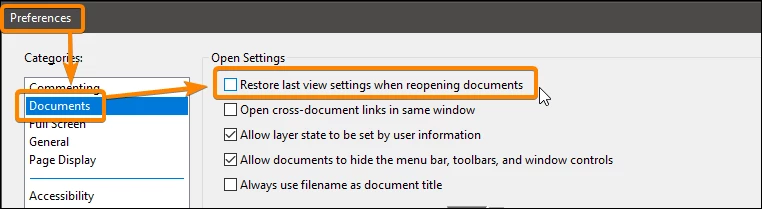
You should try this setting:


4 replies

JR Boulay
Community Expert
Community Expert
February 23, 2024

Sorry, I don't use Acrobat online.

Acrobate du PDF, InDesigner et Photoshopographe
JR Boulay
Community Expert
Community Expert
September 20, 2021

MOVED TO THE ACROBAT READER FORUM

Acrobate du PDF, InDesigner et Photoshopographe
JR Boulay
Community Expert
JR BoulayCommunity ExpertCorrect answer
Community Expert
September 20, 2021

You should try this setting:


Acrobate du PDF, InDesigner et Photoshopographe
Participant
September 20, 2021

Thank you so much. You saved me. It is the exact thing I was looking for.

Eric Dumas
Community Expert
Community Expert
September 20, 2021

Hi,

I don't think that reader remembers the page you read last. It does on mobile, but on Windows 10 you might need to add a bookmark, comment if allowed