
Participant
July 18, 2018
Answered

PDF won't open - Program opens, but the PDF will not

  • July 18, 2018
  • 1 reply
  • 585 views

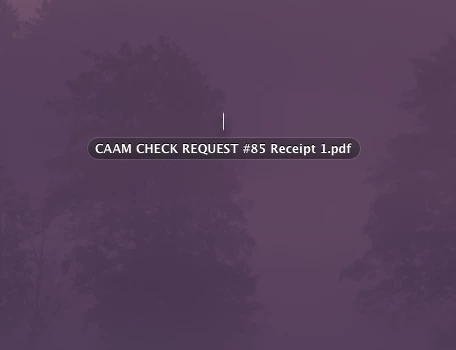
Adobe opens when I select a PDF to open, but nothing happens. NO error code, nothing. If I right click on adobe and show all windows, I see the name of the file on a screen all it's own, but the image above the file name is teeny tiny. I'm on a MacBook Air Sierra OSX - never have had an issue until today. Had used it yesterday ... Also my images (screen shots, photos) do the same thing. They move as though they open but do not open on desktop to see. See image attached. But that file won't open in any way.
    This topic has been closed for replies.
    Correct answer AnandSri

    Hello Maddoxc,

    We're sorry for the trouble you had while opening PDF files, please reboot the machine once and try opening the PDF files and see if this brings up the PDFs.

    Try opening the PDF files from Window>Cascade>Tile and see if that brings up the PDFs. Check for any pending updates of Adobe Reader from help>check for updates, reboot the machine after updating Adobe Reader.

    You can also refer and try the suggestions from the following Adobe article Can't open PDF

    What is the dot version of Adobe Reader installed? To identify refer to Identify the product and its version for Acrobat and Reader DC

    Are you not able to open all the PDF files or is it specific to one PDF?

    if the issue persists after updating Adobe Reader, please use Acrobat cleaner tool to remove Adobe Reader Download Adobe Reader and Acrobat Cleaner Tool - Adobe Labs Reboot the machine and install the latest version of Adobe Reader from Adobe - Adobe Acrobat Reader DC Distribution

    Let us know how it goes and share your observation.

    Thanks,

    Anand Sri.

    1 reply

    AnandSri
    AnandSriCorrect answer
    Legend
    July 19, 2018

    Hello Maddoxc,

    We're sorry for the trouble you had while opening PDF files, please reboot the machine once and try opening the PDF files and see if this brings up the PDFs.

    Try opening the PDF files from Window>Cascade>Tile and see if that brings up the PDFs. Check for any pending updates of Adobe Reader from help>check for updates, reboot the machine after updating Adobe Reader.

    You can also refer and try the suggestions from the following Adobe article Can't open PDF

    What is the dot version of Adobe Reader installed? To identify refer to Identify the product and its version for Acrobat and Reader DC

    Are you not able to open all the PDF files or is it specific to one PDF?

    if the issue persists after updating Adobe Reader, please use Acrobat cleaner tool to remove Adobe Reader Download Adobe Reader and Acrobat Cleaner Tool - Adobe Labs Reboot the machine and install the latest version of Adobe Reader from Adobe - Adobe Acrobat Reader DC Distribution

    Let us know how it goes and share your observation.

    Thanks,

    Anand Sri.