
PDFs in from SharePoint Search Dropdown Don't Open
Hello,
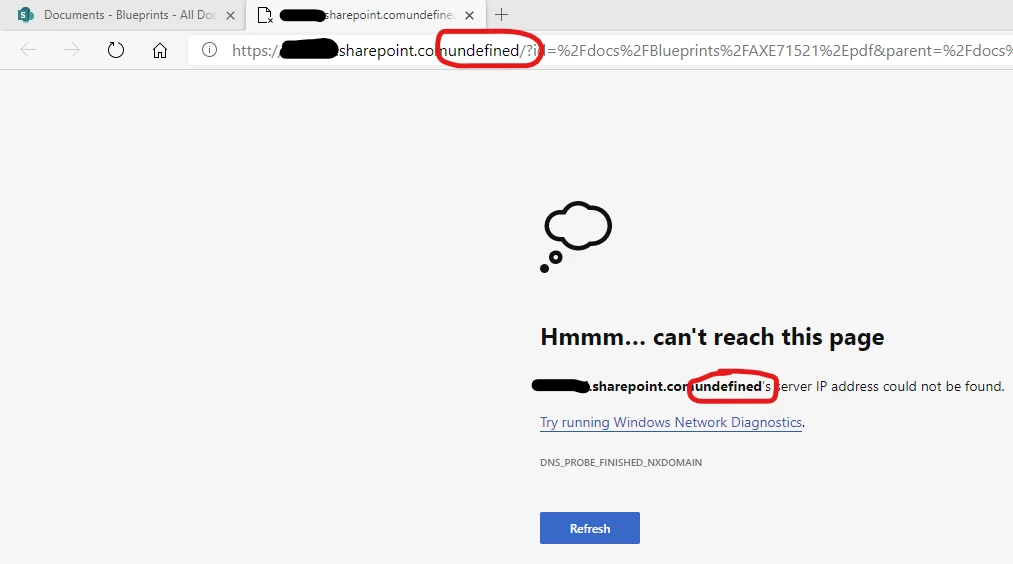
When searching for a PDF in any of our SharePoint Online document libraries and clicking the PDF in the search dropdown of the library it opens a page with the the normal SharePoint URL but it has "undefined" at the end.
In order to get the PDF to open successfully I have to refresh the page and then when I search for the same document again it opens successfully.
I have a support ticket open with Microsoft but they have been struggling to fix the problem and wanted me to reach out here to see if this could be an Adobe Reader issue rather than a SharePoint Online issue.
Thank you for your help!
Zach
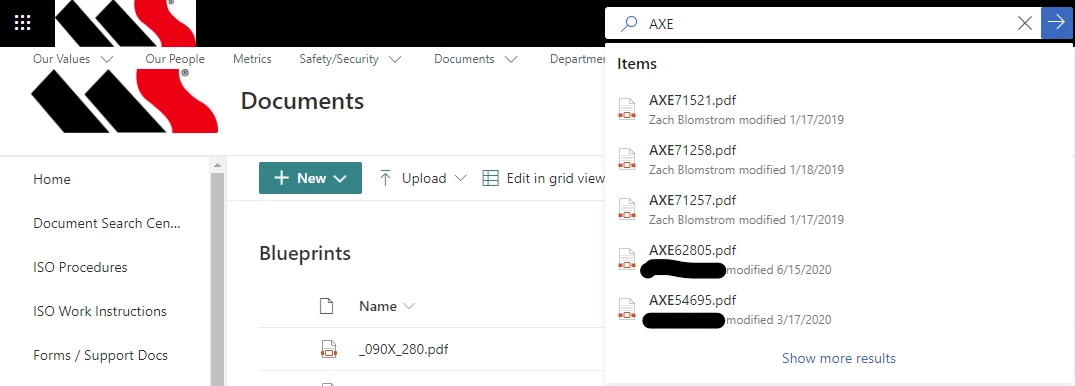
1. Search for AXE and click on AXE71521 for example.
2. After clicking on AXE71521 from the search dropdown menu this is the page that I get. As you can see "undefined" is added to the end of our SharePoint URL.
As soon as I go back to the SharePoint document library, refresh the page, search for the document again, and then click on it in the dropdown it opens successfully.
 AdChoices