rolfu52413850
Participant
February 26, 2018
Answered

Photos (jpg files) are automatic opened as pdf files. They are not visible!!

  • February 26, 2018
  • 2 replies
  • 32354 views

I have "made" Acrobat Reader DC to open photos (jpg files) as pdf files. How can I set it back only to open pdf files - not jpg files?

    This topic has been closed for replies.
    Correct answer AkanchhaS8194121

    Hi Rolfu,

    As per the information given above, it seems like Adobe Reader has set to default app to open all the files. As if you do not want to open the jpg files to open with Adobe Reader DC, then you may try the following-
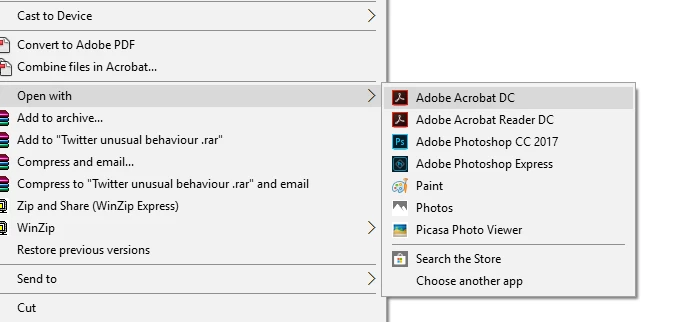
    • Select any .JPG file>Right click on it
    • Select Open With and "Choose another app" (at the bottom)


    • Select the app you want to make default .JPG file viewer.
    • Check the box "Always use this app to open .JPG file"> OK

    Hope this helps.

    Regards,

    Akanchha

    2 replies

    Participant
    November 30, 2023

    I had this same problem. How I solved it was this:

    open the attachment (it will open in adobe)

    Save the attachment

    Locate the saved attachment

    Right click on the saved attachment

    Chose open in photo (I use Windows/Microsoft photo app)

    I made my changes to the photo

    Saved the photo.

    Now when I open a photo attachment it automatically opens in the photo app (not adobe)


    I hope this helps. 

    AkanchhaS8194121
    AkanchhaS8194121Correct answer
    Legend
    February 27, 2018

    Hi Rolfu,

    As per the information given above, it seems like Adobe Reader has set to default app to open all the files. As if you do not want to open the jpg files to open with Adobe Reader DC, then you may try the following-

    • Select any .JPG file>Right click on it
    • Select Open With and "Choose another app" (at the bottom)


    • Select the app you want to make default .JPG file viewer.
    • Check the box "Always use this app to open .JPG file"> OK

    Hope this helps.

    Regards,

    Akanchha

    Participant
    September 3, 2023

    It doesn't give me those options


    Bernd Alheit
    Community Expert
    Community Expert
    September 3, 2023

    Select the file in the Windows Explorer and you will get the option.