
Please help me to disable the annoying pop up in 2019.012.20035
*******************
Account Detail:
User Rights: Admin
User Account Control: Limited
Process Integrity: Low
Profile Type: None
Acrobat Detail:
Sandboxing: OnOff
Captive Reader: No
Multi-Reader on Desktop Support: Off
Available Physical Memory: 4194303 KB
Available Virtual Memory: 3782920 KB
BIOS Version: DELL - 1072009
Default Browser:
Default Mail: Microsoft Outlook
mapi32.dll
Version: 1.0.2536.0 (WinBuild.160101.0800)
Display Detail:
Screen Width: 1920
Screen Height: 1080
Number of Monitors: 2
Number of Mouse Buttons: 8
Has Mouse Wheel: Yes
Has Pen Windows: No
Double Byte Character Set: Yes
Has Input Method Editor: Yes
Inside Screen Reader: No
Graphics Card:
Version: 0.0.0.0
Check: Not Supported
Installed Acrobat:
Installed Acrobat: C:\Program Files (x86)\Adobe\Acrobat Reader DC\Reader\AcroRd32.exe
Version: 19.12.20035.332343
Creation Date: 2019/06/11
Creation Time: 3:57:56 AM
Locale: English (United States)
Monitor:
Name: NVIDIA Quadro P600
Resolution: 1920 x 1080 x 60
Bits per pixel: 32
OS Manufacturer: Microsoft Corporation
OS Name: Microsoft Windows 10
OS Version: 10.0.17134
Page File Space: 4194303 KB
Processor: Intel64 Family 6 Model 158 Stepping 9 GenuineIntel ~3312 Mhz
Session Detail:
Boot Type: Normal
Is Shutting Down: No
Network: Available
Inside Citrix: No
Inside VMWare: No
Remote Session: No
Remote Control: No
Using JAWS: No
Using ZoomText: No
Using Windows-Eyes: No
Using NVDA: No
System Name: DESKTOP-TMHR1DK
Temporary Directory: C:\Users\zhnan\AppData\Local\Temp\acrord32_sbx\
Time Zone: China Standard Time
Total Physical Memory: 4194303 KB
Total Virtual Memory: 4194176 KB
User Name: zhnan
Windows Detail:
Tablet PC: No
Starter Edition: No
Media Center Edition: No
Slow Machine: No
Windows Directory: C:\WINDOWS
************************
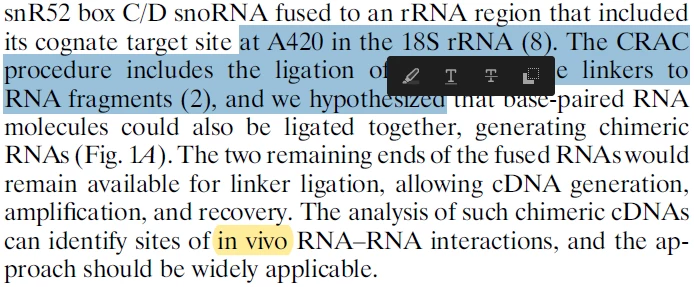
Problem: As shown in the screenshot below, whenever I select some text, a black pop up shows up. It distracts my concentration from reading. I have tried to set "preferencs -> commenting" as many threads (for example, Disable Highlight Pop Up Note Problem ) suggested but not working. Can any body help me out? Thanks in advance.
 AdChoices