
Inspiring
October 9, 2018
Answered

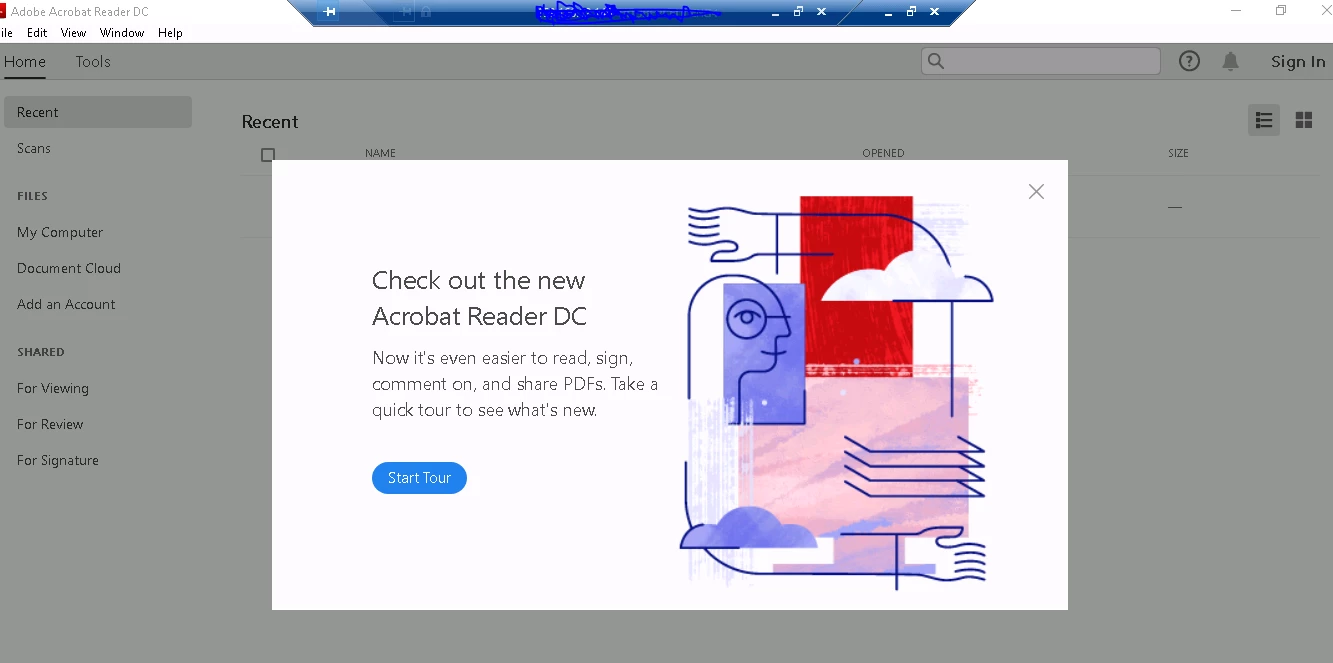
Please help me to suppress the following Popup which states "Start tour" on the first launch of Adobe acrobat Reader DC 19 (Latest). I have tried the following registry key but not helping. [HKEY_LOCAL_MACHINE\SOFTWARE\Policies\Adobe\Acrobat Reader\D
  • October 9, 2018
  • 5 replies
  • 30170 views

Correct answer Steve Cordero

Ditto about the title and description.

Here is the information that you seek:

General Preferences

bHideHelpWelcome

Supported on WindowsSupported on MacSupported by AcrobatSupported by Adobe Reader

Data typeboolean: DWORD value > REG_DWORD
Default0
Version #Oct. 2018 both tracks
HKCU PathAVGeneral
HKLM PathNot lockable
SummarySpecifies whether to disable the Welcome menu item under Help.
DetailsPossible values include:
  • 0: Enable the Welcome menu item.
  • 1: Disable the Welcome menu item.

5 replies

Participating Frequently
November 15, 2018

Hi Guys,

Some of you may find that you need to do this extra step if using Windows 10.

After changing settings above in registry - you need to make the sure the local user has at least READ permissions on the "HKEY_CURRENT_USER\Software\Adobe" key.

Please note that if the user is not a local admin they will not have access to that key so the popup will never go away.

You need to temporarily make the user a local admin, then open regedit as them with admin rights - then give themselves direct READ access to the above key.

Participant
November 15, 2018

still cannot locate the registry file, and therefore still get the pop up 50 times a day

EnterpriseHelp
Inspiring
November 16, 2018

The instructions the user above provided tell you to create a new file, paste the contents he sent into the file, and then save the file with any name and in any location with a .reg extension. So I'm not sure how you can't locate the file since you created the file. Try it again, give the file "anyname.reg", save it to your desktop, and then double click it.

However, before doing all that, be aware that registry modification is an administrator task, and this is an enterprise forum for that audience. Making a mistake while modifying the registry (which is what the instructions are telling you to do), can result in your computer not working.

Participant
November 2, 2018

Im sorry but i have no understanding of where to go to do this actions.   it is very unclear -  please for the noob/novice, can u explain please, as im about to uninstall Adobe, its driving me more insane

EnterpriseHelp
Inspiring
November 2, 2018

The solution above is for enterprise administrators. It's not wise to edit the registry if you're inexperienced. Just go through a couple of tour screens and close the window. If you still see the tour after the next product launch, post back.

Participant
November 4, 2018

have taken the tour many times it doesnt go away   that is why im on here in desperation

robertm91183282
Participating Frequently
October 22, 2018

Answer in this other thread worked for me!

Check out the new Acrobat Reader DC message

Participating Frequently
October 22, 2018

Hello Robert,

Tried is as you mentioned but still i get the Welcome Tour..

[HKEY_CURRENT_USER\SOFTWARE\Adobe\Acrobat Reader\DC\FTEDialog]

@=""

"iFTEVersion"=dword:0000000a

"iLastCardShown"=dword:00000000

EnterpriseHelp
Inspiring
October 22, 2018

Set HKLM\SOFTWARE\WOW6432Node\Policies\Adobe\(product name)\(version)\FeatureLockdown\bToggleFTE to 0.

Docs have been updated: Lockable Settings

Steve CorderoCorrect answer
Adobe Employee
October 9, 2018

Ditto about the title and description.

Here is the information that you seek:

General Preferences

bHideHelpWelcome

Supported on WindowsSupported on MacSupported by AcrobatSupported by Adobe Reader

Data typeboolean: DWORD value > REG_DWORD
Default0
Version #Oct. 2018 both tracks
HKCU PathAVGeneral
HKLM PathNot lockable
SummarySpecifies whether to disable the Welcome menu item under Help.
DetailsPossible values include:
  • 0: Enable the Welcome menu item.
  • 1: Disable the Welcome menu item.
Inspiring
October 10, 2018

Re-posting: 

Hi, please help me in suppressing First popup (not welcome screen) as shown below. It says something like " Check out the new Acrobat Reader DC" and has "Start tour" button on it. I would like to suppress this via registry settings since  I am packaging this for enterprise distribution.

I have added following registry key for welcome screen which is working and Suppressing the welcome screen I hope, but need to suppress the following . Thanks in advance.

[HKEY_LOCAL_MACHINE\SOFTWARE\Policies\Adobe\Acrobat Reader\DC\FeatureLockDown]

"bShowWelcomeScreen"=dword:00000000

EnterpriseHelp
Inspiring
October 9, 2018

Please repost with a proper title and the details in the body of the post. You've posted everything in the title and it can't be read.

Participant
January 16, 2025

This thread shows how ridiculous the Adobe software is, and they will never bother to fix it because there is no good alternative software now(believe me when there is I will switch immediately). No matter how many boxes etc you uncheck in Preferences the whats new and other popups persist, where there should just be a "do not show again" checkbox. The homescreen takes up a quarter of the screen with videos with peoples faces that no one wants to watch and that you can't get rid of. Look at how ridiculous this thread is, with users having to change registry keys and Adobe employees playing dumb by pretending to not understand these issues and requiring the users to waste time reposting. This is the worst software user experience on the internet.