Participant
May 17, 2019
Answered

Pop-up when highlighting text

  • May 17, 2019
  • 1 reply
  • 4995 views

Hello,

When i select text in Acrobat Reader DC i get a black pop-up with options to highlight, strike-through, underline, or copy text.

How do I turn that off?

Thanks

Message was edited by: Moderator (Discussion successfully moved from Forum comments to Acrobat Reader)

    This topic has been closed for replies.
    Correct answer Meenakshi_Negi

    It's been over 2 months. When can we expect the update?


    Hi All,

    Hi All,

    We have released an update today for Adobe Acrobat 2015, Acrobat 2017 and Acrobat DC in which you can hide the toolbar using a newly added preference. By default, the toolbar is enabled. Check the screenshot below:
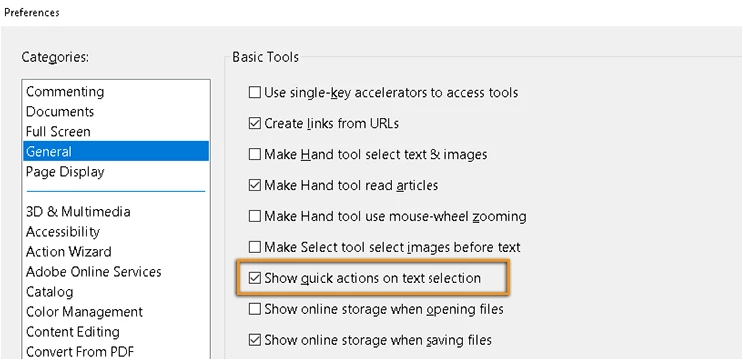
    This update will be automatically pushed to all existing installations of Acrobat and Reader. If you want, you may also manually trigger the update early by opening the application and going to Help > Check for Updates.

    You may refer to the following link to check the latest versions available. Release Notes | Adobe Acrobat, Reader

    For more details on the new update, please refer to the following help document What's new in Adobe Acrobat DC

    Let us know if you have any questions.

    Regards,

    Meenakshi

    1 reply

    Arpit_Agarwal
    Adobe Employee
    Adobe Employee
    May 20, 2019

    HI Tim,

    This is the new feature we have introduced in Acrobat. Whenever we select the text we get the Floating toolbar with some commenting actions as described by you. This is for the ease of using these options as otherwise we have goto tool mode to use these options. Could you please tell whats the problem you are facing using these tools ?, so that I can help you better.

    tim1921Author
    Participant
    May 20, 2019

    Hi Arpit,

    The floating toolbar gets in the way. How do I turn it off?

    -Tim


