


Inspiring
December 22, 2020
Question

Populate fields based on dropdown selection

  • December 22, 2020
  • 1 reply
  • 394 views

Hello Adobe community,

     I need help with the following task. I have an excel spreadsheet that consists of Room Status (consists only VAV and CAV). , Room Numbers (multiple rooms), Shop Name (multiple rooms) and Parent Loction (multiple rooms).  My senario is when Room_No is picked, I want all fields (VAV_CAV,Shop_Name &Parent_Location ) related to that Room_No populated. A room is either CAV or VAV has a shop name and parent location.

Field names:

Room Number (Room_No), Shop Name (Shop_Name) and Parent Loction (Parent_Location).
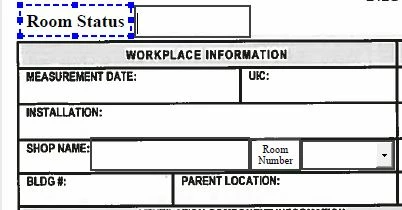
 

I appreciate your time and help.

Adosh.

This topic has been closed for replies.

1 reply

try67
Community Expert
Community Expert
December 22, 2020

Assuming this is a PDF form, and you have Acrobat, you can achieve it using a custom-made script.

See this tutorial on how to do it:

https://acrobatusers.com/tutorials/change_another_field


If you're interested, I've created a (paid-for) tool that allows you to set it up very quickly and easily, without having to write any code. You can find it here:

http://try67.blogspot.com/2015/07/acrobat-populate-fields-from-dropdown.html

You can also get it from my new web-site, where's there's currently a "soft launch" sale (The discount code is available on the front-page):

https://www.try67.com/tool/acrobat-populate-fields-from-dropdown