
Known Participant
September 3, 2025
Answered

Popup "An internal error occurred" although Acrobat Reader is not running

  • September 3, 2025
  • 1 reply
  • 154 views

Hi,

since several days I have the issue that the Popup is shown, although Acrobat Reader is not running:
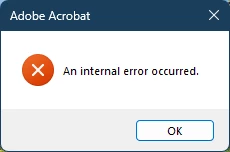
 Adobe Acrobat

An internal error occurred.


Adobe Acrobat Reader

Continuous Release | Version 2025.001.20643 | 64-bit

Windows 11 Version 24H2 (Build 26100.4851)

Correct answer Amal.

Hi there,


Hope you are doing well and thanks for bringing this up.


This error message usually points to a background process or a conflict with Acrobat Reader even if the app itself isn’t visibly running. A couple of quick checks you can try:

  • Restart your system and check if any background Acrobat processes are still running in Task Manager (Windows) or Activity Monitor (Mac). If yes, end those tasks.
  • Since you are on the latest version already, try repairing the installation via Help > Repair Installation and reboot the application once. 
  • If the issue continues, you may also try a clean reinstall of Acrobat Reader. Remove the application using the Acrobat cleaner tool https://adobe.ly/4pn7bCv , reboot the computer and reinstall the application using the direct link https://adobe.ly/47WMZRk 


Let us know how it goes.


~Amal

1 reply

Amal.
Amal.Correct answer
Legend
September 3, 2025

Hi there,


Hope you are doing well and thanks for bringing this up.


This error message usually points to a background process or a conflict with Acrobat Reader even if the app itself isn’t visibly running. A couple of quick checks you can try:

  • Restart your system and check if any background Acrobat processes are still running in Task Manager (Windows) or Activity Monitor (Mac). If yes, end those tasks.
  • Since you are on the latest version already, try repairing the installation via Help > Repair Installation and reboot the application once. 
  • If the issue continues, you may also try a clean reinstall of Acrobat Reader. Remove the application using the Acrobat cleaner tool https://adobe.ly/4pn7bCv , reboot the computer and reinstall the application using the direct link https://adobe.ly/47WMZRk 


Let us know how it goes.


~Amal