
Participant
November 16, 2017
Answered

Prevent Adobe from opening in IE

  • November 16, 2017
  • 2 replies
  • 1343 views

We are using a 2016 windows remote desktop.

We are using Adobe XI

We are using IE 11.

I want to stop IE from opening a PDF file when a user clicks on our SharePoint site.

I have disabled the add-on in IE.

I have added a registry hack to prevent this as well.

[HKEY_CURRENT_USER\Software\Adobe\Acrobat Reader\11.0\Originals]

"bBrowserIntegration"=dword:00000000

Guess what?  IE still opens it.  Why?  This works fine for another user on the same remote desktop.  It's a virgin remote desktop.  We put the first user on and our app works.  The second user cannot function because IE and Adobe are fighting me and insist on opening despite all these steps I have taken.

I can't seem to stop this from happening and it is making us insane.  It shouldn't be this difficult.
    This topic has been closed for replies.
    Correct answer Ethereal_Coral6C1B

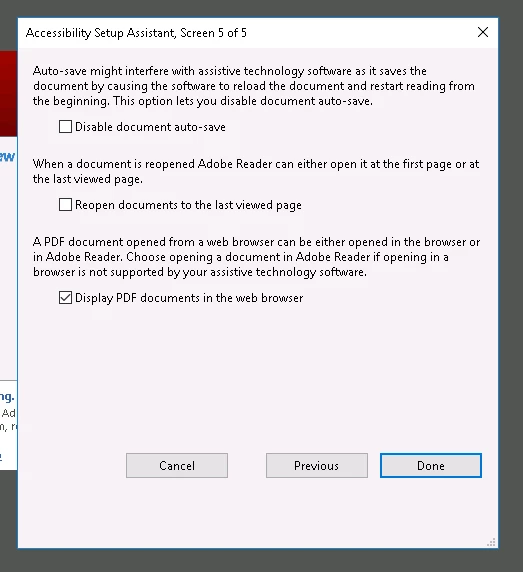
    I have also gone through the Assembly Setup and unchecked "Display PDF documents in the web browser" on the 5th screen.

    2 replies

    Ethereal_Coral6C1BAuthorCorrect answer
    Participant
    November 16, 2017

    I have also gone through the Assembly Setup and unchecked "Display PDF documents in the web browser" on the 5th screen.

    Participant
    November 16, 2017

    I also have verified this registry key is set to disable this from another post:

    HKCU\Software\Microsoft\Windows\CurrentVersion\Ext\Settings\{CA8A9780-280D-11CF-A24D-44455 3540000}

    There is a value under there called Flags. Toggling that to REG_DWORD 0x00000001 (1) seems to disable the plugin in IE.