


Participant
February 26, 2021
Question

Prevent File menu items changing

  • February 26, 2021
  • 2 replies
  • 323 views

Hi there,

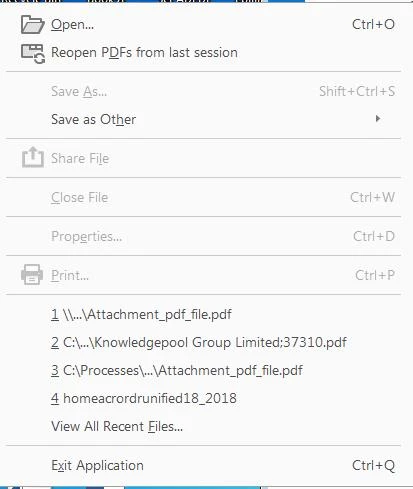
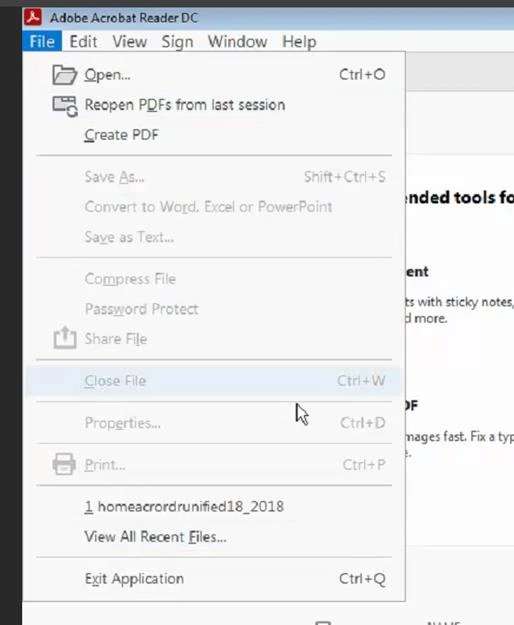
I use this on several machines, and I am finding the File menu keeps changing. When it is first installed the file men looks like the first picture, and then will sometimes change the second picture. I am assuming this is being caused by a PDF being opened but I haven't been able to prevent it, meaning the only way I can revert is to reinstall Reader. Can you tell me firstly what to do to revert back to the first picture without a reinstall, and secondly how I prevent it happening in the first place.

Picture 1
Picture 2
 

This topic has been closed for replies.

2 replies

try67
Community Expert
Community Expert
February 26, 2021

Adobe decides what to include in those menus. You can't customize it directly, but a script can be used to add new menu items and in the past even to hide existing ones, although I'm not sure that still works.

Legend
February 26, 2021

I haven't seen this happen but

1. Make sure you are starting Reader DIRECTLY from the Start menu rather than by double clicking

2. Check the properties of Acrord32.exe and make sure there are no compatibility settings.