
Participating Frequently
July 29, 2023
Question

Print settings

  • July 29, 2023
  • 2 replies
  • 461 views

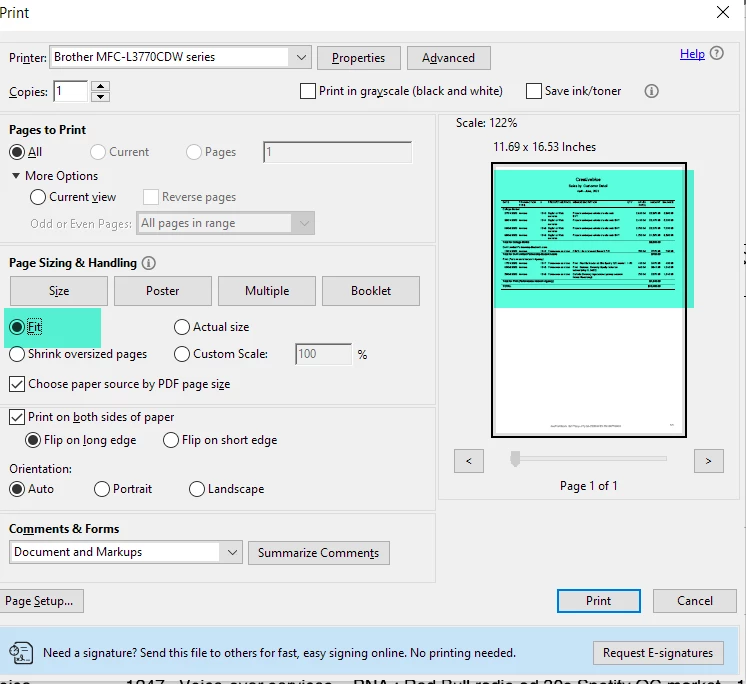
ADOBE Printing settings are a nightmare. Even if i have FIT selected (in Page size) and the actual image shows a nice full text with almost no margins, Adobe still prints the text too small with a VERY LARGE right margin. Insane. I have playing with tons of settings. Scaling is off in my Brother settings. 
 

This topic has been closed for replies.

2 replies

jane-e
Community Expert
Community Expert
July 30, 2023

Hi @Virtual Citizen 


You replied to a four-year old resolved thread and I have branched your post to a new thread for you.


I see that you are printing at 122% and the size is 11.69 x 16.53 inches.You say that you want the image to go edge to edge on the paper.


  • What is the paper size that you have in your printer?
  • Can your printer do borderless printing?
  • If you fill a page with a black square and print, how close to the border does the ink come?
  • How many trays do you have in your printer? What are the other paper sizes?
  • I notice the green is spilling past the right edge. Is that part being cut off when you print?
  • Instead of "very large", how large is the right margin? (Measure it)


Jane


Participating Frequently
July 31, 2023

Hi Jane

Yes i replied to an old post, which proves that similar issues can show up again. The green highlights were simply added with Snagit to show parts of the things i was referring to. 

I use a Brother laser multi function printer with 1 main tray to hold paper (if you exclude flap at the front for manual feed).

- Letter size paper

- I tried Fit, 100%, 122%

- I tried Portrait, Auto... and various Advanced Settings

- In one settings I could not changed the margins (stuck at 25mm both sides).

- My Brother printer drivers are updated when they come up in the notifications

I can print with very very small margins but never tested no margin.


It's mind buggling. It must be such an obvious settings hiding in plain sight. Or a Brother printer setting which is taking over the Adobe Reader PDF settings. ... 


Participating Frequently
July 29, 2023

(I can't edit my previous post because i am considered a beginner user). Just wanted to add that I also tried other settings without success such as Actual Size, 100%, 120%, Print as Image, etc. The columns and text of the PDF still do not print using the entire space like i want.