Participant
May 6, 2019
Answered

Print size is too small

  • May 6, 2019
  • 2 replies
  • 8863 views

HI, I've been trying to print a pdf, and since last Friday, it's been printing smaller than it normally did.  I'm not sure how or why that happened? or how to get it back to how it was printing before?  I uninstalled & reinstalled and restarted my computer, but it's still printing too small to fit into our envelopes.

[Title edited by moderator for clarity. Was “adobe reader dc“.]
    This topic has been closed for replies.
    Correct answer jane-e

    Yes, that's the setting — either fit page or actual size. If you change it for one document, it remembers it until you change it again.

    2 replies

    jane-e
    Community Expert
    Community Expert
    May 7, 2019

    Hi Jen,

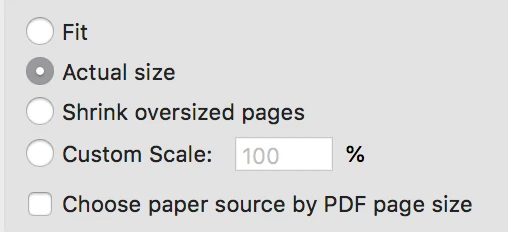
    Can you show a screen shot of your Print dialog box? On the left toward the bottom is an area where the size can be adjusted. It’s sticky, meaning if it was adjusted once, Acrobat remembers it until it’s changed again.

    ~ Jane

    Participant
    May 7, 2019

    I believe I figured it out... I changed it to print to fit the page & that

    seemed to work.... not sure how it ever got changed?

    jane-e
    Community Expert
    jane-eCommunity ExpertCorrect answer
    Community Expert
    May 7, 2019

    Yes, that's the setting — either fit page or actual size. If you change it for one document, it remembers it until you change it again.

    Participant
    May 6, 2019
    • Case Number: ADB-7018873-X6M5
    • Issue:  Download/Install

    We’ve found these self-help articles if you’d like more information about your issue:

    https://forums.adobe.com

    I'm not sure how this helpful?  I can't figure out why it's printing so small??