Participant
February 9, 2021
Answered

printed page is larger does not fit on paper

  • February 9, 2021
  • 2 replies
  • 4924 views

when printing off my email and saving to pdf for printing some file are oversized and are longer than the width of the paper.   I have to reprint several times after reducing the the size of the text several times to make it fit.  Is there a function that does this automatically.  thanks

This topic has been closed for replies.
Correct answer swapnilsrivastava
 

Hi There,


Thanks for reporting the concern here.

For printing with expected scale one can use either of below options :
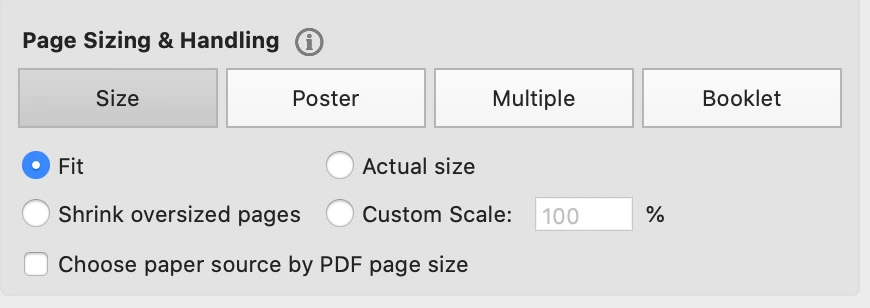
Fit - Reduces or enlarges each page to fit the printable area of the currently selected paper size. For PostScript® printers, the PPD determines the printable area of the paper.

Actual Size - Prints the pages without scaling. Pages or selections that don’t fit on the paper are cropped. You can set this option as the default using the None print preset. See Create print presets.

Shrink Oversize Pages - Shrinks large pages to fit the currently selected paper size but doesn’t enlarge small pages. If an area is selected and is larger than the printable area of the currently selected paper, it’s scaled to fit the printable area. This option is always active during N-up printing. You can set this option as the default using the Default print preset. See Create print presets.

Custom Scale  Resizes the page by the percentage you specify.

Choose Paper Source By PDF Page Size - Uses the PDF page size to determine the output tray rather than the page setup option. This option is useful for printing PDFs that contain multiple page sizes on printers that have different-sized output trays.


Feel free to let us know, regarding any issue observed,


Regards,

Swapnil Srivastava

2 replies

swapnilsrivastava
Community Manager
swapnilsrivastavaCommunity ManagerCorrect answer
Community Manager
February 10, 2021
 

Hi There,


Thanks for reporting the concern here.

For printing with expected scale one can use either of below options :

Fit - Reduces or enlarges each page to fit the printable area of the currently selected paper size. For PostScript® printers, the PPD determines the printable area of the paper.

Actual Size - Prints the pages without scaling. Pages or selections that don’t fit on the paper are cropped. You can set this option as the default using the None print preset. See Create print presets.

Shrink Oversize Pages - Shrinks large pages to fit the currently selected paper size but doesn’t enlarge small pages. If an area is selected and is larger than the printable area of the currently selected paper, it’s scaled to fit the printable area. This option is always active during N-up printing. You can set this option as the default using the Default print preset. See Create print presets.

Custom Scale  Resizes the page by the percentage you specify.

Choose Paper Source By PDF Page Size - Uses the PDF page size to determine the output tray rather than the page setup option. This option is useful for printing PDFs that contain multiple page sizes on printers that have different-sized output trays.


Feel free to let us know, regarding any issue observed,


Regards,

Swapnil Srivastava

radzmar
Community Expert
Community Expert
February 9, 2021

What has this to do with Acrobat Reader? You can't create PDFs with it.